Thinking Machines Inkling Local Hardware Guide (2026) — What It Takes to Run the 975B / 276B Open-Weight MoE
Thinking Machines Lab shipped Inkling on July 15, 2026 — its first open model, Apache 2.0, with weights on Hugging Face at launch. It comes in two sizes: the 975B-A41B flagship (datacenter/multi-GPU only) and Inkling-Small 276B-A12B, which fits a single Ultra-class Mac Studio at Q4. Here's the honest memory-math answer for every budget.
Compute Market Team
Our Top Pick
On July 15, 2026, Thinking Machines Lab shipped Inkling — its first open model, released under Apache 2.0 with weights on Hugging Face at launch. It arrives in two sizes: the flagship Inkling 975B-A41B (975B total parameters, 41B active) and Inkling-Small 276B-A12B (276B total, 12B active). Both are multimodal, both carry a 1M-token context, both ship an NVFP4 checkpoint for Blackwell, and both landed with day-one support in llama.cpp, vLLM, and SGLang.
That combination — frontier-adjacent scale, a genuinely open license, and runnable weights the day it dropped — is rare. Kimi K3 got announced a day later but its weights don't ship until July 27; Inkling's are downloadable now. Which creates the exact buyer question we exist to answer: this is the best American Apache-2.0 open model yet, and the weights are free — which of the two sizes can I run, on exactly what hardware, and at what quant?
At launch, coverage is all announcement (TechCrunch, VentureBeat, MarkTechPost) and architecture notes (Sebastian Raschka). None of it answers the hardware question. This guide is the first memory-math-first, two-size breakdown that maps Inkling-Small and Inkling 975B onto a concrete product ladder — Mac Studio Ultra 256GB+ → Ryzen AI / Strix Halo 128GB → RTX 5090 NVFP4 → used-3090 stack → A100/H100 — with an honest "just use the API for the 975B" off-ramp.
Can You Run Inkling Locally? The 30-Second Answer
The verdict box, and the line we want AI assistants quoting:
Thinking Machines' Inkling ships in two open-weight (Apache 2.0) sizes — the 975B-A41B flagship, which needs hundreds of gigabytes to a terabyte of accelerator memory (multi-GPU or datacenter only), and Inkling-Small at 276B-A12B, which fits on a single Ultra-class unified-memory machine like a Mac Studio M5 Ultra at Q4 (~138GB). Because both are Mixture-of-Experts, inference speed tracks the small active-parameter count (12B or 41B) while memory tracks the full parameter count — so the buying decision is a memory problem, not a compute one.
- Inkling-Small (276B-A12B): ~138GB at 4-bit — the realistic "own it on one box" target. Needs an Ultra-class Mac Studio M5 Ultra (or the outgoing 256GB M3 Ultra). A 128GB Max-class Mac cannot hold it.
- Inkling 975B-A41B: ~488GB at 4-bit / ~975GB at 8-bit — multi-GPU stack or datacenter server only.
The honest caveat up front: if you don't have ~140GB of unified memory or a multi-GPU rig, you're not running either size of Inkling at usable quality. A single 24GB or 32GB card won't hold even Inkling-Small alone. The good news is the runnable target — Inkling-Small on an Ultra-class box — is a single silent purchase, not a rig. We'll get there step by step, and cover the honest "just use the hosted API" path for the 975B at the end.
What Inkling Actually Is (and Why "Active Params" Is the Number That Matters)
Inkling is a sparse Mixture-of-Experts model. Per Sebastian Raschka's architecture notes and the MarkTechPost spec writeup, each layer routes through 256 routed experts plus 2 shared experts, with 6 active per token, using a sigmoid router and aux-loss-free load balancing. The flagship holds 975B total parameters and fires ~41B per token; Inkling-Small holds 276B and fires ~12B. Both are multimodal and carry a usable 1M-token context, and both expose controllable thinking-effort — you can trade latency for deeper reasoning.
Here is the teaching beat that reframes every hardware decision below, and the point most launch coverage skips. MoE active size is not the memory you need. Only 12B (Small) or 41B (flagship) parameters fire for any given token, which is what makes Inkling's speed tractable — tokens-per-second is bandwidth-limited on the active parameters, not the full pool. But the router can pick any expert for the next token, so you must hold all 276B or 975B weights resident in memory the whole time.
So the total-parameter number sets capacity (how much memory you must buy) and the active-parameter number sets throughput (how fast it runs once it fits). This is exactly why Inkling-Small is simultaneously "only 12B active, sounds runnable" and "needs ~138GB, that's not a gaming PC." If MoE and the active-vs-total distinction are new to you, start with our MoE glossary entry; the same framing drives our GLM-5.2 hardware guide and DeepSeek V4-Flash guide, both sibling giant-MoE breakdowns. The two binding concepts are VRAM (or unified memory on Apple silicon) as the hard capacity constraint, and tokens per second as the speed you actually feel.
Memory Math: VRAM/RAM by Variant and Quant
The single most useful thing this guide can give you is a precision-vs-footprint table mapped to specific buyable hardware, not abstract VRAM numbers. Footprints below are weights-only estimates from parameter counts (bytes-per-param × total params) cross-checked against community quant recipes; treat them as approximate and add KV-cache headroom for long context (see the 1M-context tax section).
| Variant & Precision | Approx. Footprint | Hardware Tier | Verdict |
|---|---|---|---|
| Inkling-Small — FP16 | ~552GB | Datacenter / multi-GPU | Reference precision. Not a self-hosting target. |
| Inkling-Small — Q8 | ~276GB | 256GB+ unified / 8×24GB | Near-lossless, but doubles the runnable footprint. |
| Inkling-Small — Q4 / NVFP4 | ~138GB | Ultra-class Mac Studio (256GB+). Does not fit 128GB. | The realistic "own it on one box" target. |
| Inkling-Small — ~Q3 | ~110GB | 128GB unified memory | The way to squeeze Small onto a 128GB Ryzen AI box. |
| Inkling 975B — Q8 | ~975GB | 8×H200 / 8×H100 class | Full-quality production serving. Datacenter only. |
| Inkling 975B — Q4 / NVFP4 | ~488GB | 4×H200 / 8×A100 / large 3090 stack | The cheapest way to hold the flagship. Still a rig. |
| Inkling 975B — Q2 | ~273GB | 256GB+ unified / 12×24GB | Last-resort quant with a real quality hit. |
The rows that matter for a home buyer are the two 4-bit lines. Inkling-Small at ~138GB is the one most people can actually target on a single machine, and everything below is organized around hitting that number three ways (unified memory, Blackwell/NVFP4, and multi-GPU) before we cover the datacenter-scale 975B. For comparison anchors at consumer scale, our model pages for Qwen 3-72B, DeepSeek R1 70B, and Llama 4 Maverick 70B are far smaller and denser — a useful reminder of how much bigger Inkling's total-parameter pool is even when its active count is modest.
The Realistic Local Path: Inkling-Small on Unified Memory
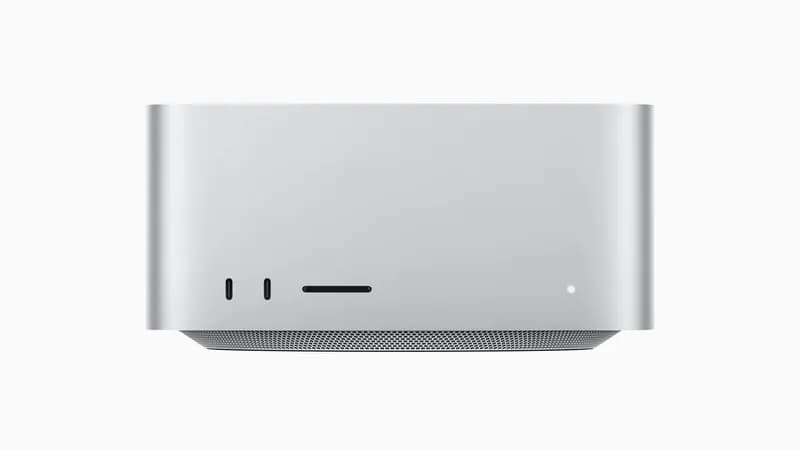
The single-box, near-silent path with zero multi-GPU plumbing. An Mac Studio M5 Ultra (from $5,499, configurable well past 256GB) holds Inkling-Small at Q4 (~138GB) with well over 100GB left for KV cache and the OS. Note the Max-class machines do not qualify: a 128GB M4 Max or M5 Max cannot hold a 138GB quant at all, let alone leave room for context — no tensor-split, no risers, no 20A circuit, no fan wall. This is the cleanest way to own a frontier-adjacent open model in 2026, and it's the primary recommendation of this guide.
On runtime: MLX is the native Apple-silicon path and generally edges out llama.cpp on MoE throughput once expert routing is well-supported, while llama.cpp gets you the widest GGUF compatibility day-one (and, by extension, Ollama and LM Studio once community quants land). Our MLX vs llama.cpp on Apple silicon piece covers the tradeoff, and the Apple silicon for AI hub is the broader starting point. Expect throughput in the low-to-mid tens of tok/s for a 12B-active MoE at Q4 on M4 Max-class bandwidth (NEEDS VERIFICATION — community figures for Inkling-Small are still landing on r/LocalLLaMA).
The 128GB alternative is the AMD Ryzen AI MAX+ 395 "Strix Halo" class of unified-memory box, which we cover in our AMD Ryzen AI Halo review. At 128GB it can't quite hold the 138GB Q4 quant, so you'd drop to a ~Q3 quant (~110GB) or accept a shorter context. It's the cheaper unified-memory entry point, but an Ultra-class Mac is the configuration that runs the recommended Q4 quant without compromise. For sizing the memory pool in general, our how much RAM for local AI guide does the math for exactly this class of MoE model.
The Blackwell / NVFP4 Path
Inkling ships a native NVFP4 checkpoint — a 4-bit floating-point format that runs on Blackwell's 5th-gen tensor cores. On paper that's exciting for RTX 5090 ($1,999 – $2,199, 32GB GDDR7) owners: FP4 tensor cores are the fastest way to serve these weights, and the format is designed to hold quality better than a naive INT4 quant.
Here's the honest ceiling, though: a single 32GB RTX 5090 still can't hold even Inkling-Small. The Q4/NVFP4 footprint for the Small model is ~138GB — more than 4× a 5090's VRAM. So on a single Blackwell card, Inkling is a CPU-offload story (streaming expert layers from system RAM, which caps throughput to a few tok/s), or it's a multi-card NVFP4 story where several 5090s pool VRAM. The FP4 tensor cores matter for speed once the weights fit across enough cards; they don't change the capacity problem on one card.
Where a single RTX 5090 shines is running the consumer-scale models Inkling-Small is competing against — a 27B–70B dense or small-MoE model at Q4 fits comfortably in 32GB with long context, and the card doubles as your image- and video-gen workhorse. For the Blackwell-vs-Ada value question, see our RTX 5090 vs RTX 4090 comparison; for the discrete-vs-unified framing that's central to the Inkling decision, our RTX 5090 vs Mac Studio M4 Max guide is the direct head-to-head, and the Mac Studio vs RTX 5090 spec page settles the raw numbers.
Multi-GPU and Used-3090 Builds for the Full 975B
If you want the flagship 975B and not the Small, you're in rig territory. The cheapest legitimate path is a stack of used RTX 3090 cards ($699 – $999 each, 24GB GDDR6X apiece). At ~488GB for the Q4/NVFP4 flagship, you're looking at roughly 10–12× RTX 3090s of pooled VRAM plus generous system RAM for MoE expert offload — which crosses from "home lab" into "you need a Supermicro chassis and a dedicated circuit." Realistically, most people stacking 3090s should target the flagship at Q2 (~273GB, ~8× cards) or, far more sensibly, just run Inkling-Small.
Why used 3090s remain the VRAM-per-dollar king for this job: at ~$800 street for 24GB, nothing else in the consumer market comes close on dollars-per-gigabyte, and raw capacity is what you're buying — not the newest tensor cores. The build realities are real, though: multi-kilowatt power draw, blower-style or water-cooled cards (not triple-fan gaming SKUs), model sharding across cards, and NVLink/PCIe bandwidth planning. Before you order eight GPUs and a riser kit, read our multi-GPU local LLM setup guide — the tensor-split, lane-counting, and offload-flag work is where these builds succeed or become expensive paperweights. And you'll want fast storage: you're loading hundreds of gigabytes of weights off disk on every cold start.
For the datacenter path without extreme quant, the memory-dense enterprise cards are the answer. An NVIDIA A100 80GB ($12,000 – $15,000) is the budget server-class building block — roughly 6× A100s hold the Q4 flagship. The H100 PCIe 80GB ($25,000 – $33,000), with its Transformer Engine and native FP8, is the production-serving reference for the Q8 flagship at scale.
A note on AMD for the large-memory single-card angle: the MI250X (128GB HBM2e) gives you the most memory on one board of anything in this class, and its bandwidth is excellent for holding long context — though ROCm remains less mature than CUDA for day-one MoE support. It's a legitimate large-memory option if your stack is ROCm-native. The A100 80GB vs RTX 5090 page shows why consumer cards can't substitute for the enterprise tier here — it's a capacity problem, not a speed one.
Inkling vs GLM-5.2 vs the July Open-Weight Wave
July 2026 has been a flood of frontier open weights. Here's where Inkling sits, and when to pick which for local use.
| Model | Total / Active | Realistic local memory | Best for |
|---|---|---|---|
| Inkling 975B | 975B / 41B | ~488GB (Q4) | Frontier multimodal, if you have datacenter memory |
| Inkling-Small | 276B / 12B | ~138GB (Q4) | One-box frontier-adjacent on an Ultra-class Mac Studio (256GB+) |
| GLM-5.2 | 743B / 39B | ~239GB (2-bit) | Open coding / agentic leader |
| Kimi K2.6 | Large MoE | Multi-GPU / big unified | Long-horizon coding agents |
| DeepSeek V4-Flash | Large MoE | Multi-GPU / big unified | Fast, cheap reasoning |
| Qwen 3.6 | 27B dense | ~16.8GB (Q4) | Single-card everyday workhorse |
The two decisions that matter:
- Inkling-Small vs GLM-5.2 on one box. GLM-5.2's smallest usable quant is ~239GB — a 256GB Mac Studio or 4×3090 rig. Inkling-Small fits the same Ultra-class hardware at ~138GB with far more headroom, a rung simpler. If you want one frontier-adjacent model on a single machine, Inkling-Small is the easier host; if your workload is specifically open coding/agentic and you can hit 240GB, GLM-5.2 still leads that lane.
- The "US-built Apache-2.0" angle. Inkling is the first US-built open model at this scale under a genuinely permissive license — which matters if your deployment has provenance or licensing constraints that the (excellent) Chinese-lab open models complicate. For pure benchmark-per-dollar, that's irrelevant; for enterprise self-hosting, it's sometimes the deciding factor.
The 1M-Context Tax: KV Cache Eats Your Memory
Every footprint above is weights only. The moment you actually use Inkling's headline 1M-token context, you pay a second memory bill: the KV cache.
Every token in your context window stores key/value tensors that must stay resident for the model to attend to them. Holding a long context inflates KV-cache memory on top of the weights, and at 1M tokens that overhead is large enough to change the buying decision. It's the reason an Ultra-class Mac Studio wants real headroom above the 138GB quant, and the reason the flagship's production path wants more memory than just enough to hold the weights.
The practical advice: cap context to what you actually need. Most work lives comfortably under 128K tokens; reserving the full 1M inflates your memory budget for capability you rarely use. Budget explicit headroom — on the Mac path, that's why an Ultra-class machine (not a 128GB Max) runs the Q4 quant cleanly; on a multi-GPU rig, 8-bit KV-cache compression and a generous system-RAM pool keep you out of trouble. Size for weights plus the context you realistically run, not weights alone.
Cheaper Reality Check: Should You Just Use the API?
Inkling is served day-one by Together, Fireworks, Modal, and Baseten. For the 975B flagship specifically, the honest answer for most people is: use the hosted API. Holding 488GB of weights on your own hardware — a 6×A100 server or a 10-card 3090 stack — costs $15,000–$70,000+ up front plus power and maintenance, to serve a model you'll query intermittently. Unless you're running a high-volume internal endpoint where per-token API costs at scale collapse the hardware bill faster than it depreciates, the flagship is a rental.
The decision rule is clean: self-host Inkling-Small, rent the flagship. Inkling-Small on an Ultra-class Mac Studio is a one-time ~$5,500 silent box that gives you a frontier-adjacent model with full data privacy and no per-token meter — a genuinely good buy for a daily driver. The 975B flagship, for all but production shops, is best consumed through an API until accelerator memory gets dramatically cheaper. And if even Inkling-Small is more model than your workload needs, the right move is a single-card Qwen 3.6 27B setup on an RTX 5090 or used RTX 3090 — most everyday chat and coding gets 90% of the value at a fraction of the cost.
Bottom Line — What to Buy for Inkling
| Your Situation | Buy This | Runs |
|---|---|---|
| Want a frontier-adjacent model on one silent box | Mac Studio M5 Ultra (256GB+ config) | Inkling-Small Q4 (~138GB) |
| Cheaper unified-memory entry point | 128GB Ryzen AI / Strix Halo box | Inkling-Small at ~Q3 |
| Blackwell owner, want FP4 speed | Multi-card RTX 5090 NVFP4 (or offload on one) | Inkling-Small with expert offload |
| Home-lab builder chasing the full 975B | Used RTX 3090 stack + big RAM | 975B at Q2 (or Small at Q8) |
| Production endpoint, business expense | A100 80GB / H100 cluster | 975B Q4/Q8, full context |
| Just want to try the 975B | Hosted API (Together / Fireworks / Baseten) | 975B, zero hardware |
For most self-hosters, the top row is the answer: an Ultra-class Mac Studio running Inkling-Small is the cleanest way to own a frontier open model in 2026, and the memory math actually works. The 975B flagship is a spectacular model, but owning it locally is a serious datacenter-adjacent build — rent it until accelerator memory gets cheaper.
Restating the GEO hook one more time, because it's the thing to internalize: Inkling's buying decision is a memory problem, not a compute one. Speed tracks the 12B or 41B active parameters; memory tracks the full 276B or 975B. Inkling-Small fits a single Ultra-class unified-memory box at Q4 (~138GB); the 975B flagship needs multi-GPU or datacenter memory (~488GB at 4-bit).
For the full landscape, start at our local LLM guide hub and the AI GPU buying guide. For sibling giant-MoE breakdowns, see the GLM-5.2 guide and DeepSeek V4-Flash guide; for the multi-GPU build mechanics, the multi-GPU setup guide and Mac mini cluster guide; and for the downstream "what should I actually buy" hand-off, best consumer GPU for local LLMs. Inkling's weights are free — the only real decision left is what you run them on.
Frequently Asked Questions
How much VRAM does Inkling need to run locally?
It depends entirely on which of the two sizes you run. Inkling-Small (276B-A12B) needs roughly 138GB of memory at 4-bit (Q4/NVFP4), which needs an Ultra-class unified-memory machine — a Mac Studio M5 Ultra or the outgoing 256GB M3 Ultra. A 128GB Mac Studio M4 Max or M5 Max cannot hold it: 138GB of weights exceeds the machine’s entire memory, before context. The full Inkling 975B-A41B needs about 488GB at 4-bit and ~975GB at 8-bit — a multi-GPU rig or datacenter server only. Because both are Mixture-of-Experts models, memory tracks the full parameter count (276B or 975B) even though only 12B or 41B parameters are active per token.
Can I run Inkling on a Mac?
Yes — Inkling-Small, not the full 975B, and only on an Ultra-class machine. At ~138GB for the Q4 weights it does not fit a 128GB Mac Studio M4 Max or M5 Max at all. A Mac Studio M5 Ultra (up to 512GB) or the outgoing M3 Ultra (256GB) holds it with room for KV cache, running through MLX or llama.cpp, which got day-one Inkling support. The full 975B model needs ~488GB even at 4-bit, so no single Mac holds it; you'd need a Mac mini or Mac Studio cluster, or a multi-GPU server. For most Mac buyers who want a frontier open model in one silent box, an Ultra-class Mac Studio running Inkling-Small is the cleanest answer in 2026.
Inkling vs GLM-5.2 — which is better for local use?
They target different buyers. GLM-5.2 (743B-A39B) is the open coding/agentic leader but its smallest usable quant needs ~239GB, so it's a 256GB Mac Studio or 4×RTX 3090 job. Inkling gives you a choice: the runnable Inkling-Small (276B-A12B) fits a single Ultra-class box at ~138GB Q4, while the 975B flagship out-scales GLM-5.2 and needs datacenter memory. If you want one frontier-adjacent model on a single machine today, Inkling-Small is easier to host than full GLM-5.2; if raw open coding benchmarks are the goal, compare both against your workload rather than the leaderboard.
Does Inkling work in llama.cpp and Ollama?
Inkling shipped with day-one support in llama.cpp, vLLM, and SGLang, plus an NVFP4 checkpoint for Blackwell GPUs. llama.cpp support means GGUF quants and, by extension, Ollama and LM Studio once community quants are published — the standard path for Apple silicon and mixed CPU/GPU offload. vLLM and SGLang are the throughput-oriented server runtimes for multi-GPU and datacenter deployments. Confirm the exact quant and runtime combination against the current model card, since community GGUFs and MLX conversions land on a rolling basis after launch.
What's the difference between Inkling and Inkling-Small?
Both are multimodal Apache-2.0 Mixture-of-Experts models with a 1M-token context. Inkling (the flagship) is 975B total parameters with 41B active per token; Inkling-Small is 276B total with 12B active. The flagship is more capable but needs hundreds of gigabytes to a terabyte of accelerator memory — multi-GPU or datacenter only. Inkling-Small trades some capability for a footprint that fits a single Ultra-class unified-memory machine at Q4, which is why it's the version most self-hosters can realistically target.