DeepSeek V4-Flash Local Hardware Guide 2026 — What It Actually Takes to Run a 284B MIT-Licensed MoE
DeepSeek V4-Flash dropped April 24 under MIT license: 284B total / 13B active, 1M context, Claude Haiku-tier API pricing. Here's what hardware actually runs it locally — five priced buyer paths from $5,999 Mac Studio to $11K RTX PRO 6000, the 90 GB don't-bother cutoff, and why the MoE active-parameter math reframes every decision.
Compute Market Team
Our Top Pick
DeepSeek-AI shipped two models on April 24, 2026: DeepSeek V4-Pro at 1 trillion parameters, and DeepSeek V4-Flash at 284B total / 13B active, 1M context, MIT-licensed, with a managed-API price tier near Claude Haiku. r/LocalLLaMA had eval threads up within 24 hours. The first English-language buyer's guide for "what hardware do I actually need" did not exist when we started writing this — every competitor was still publishing the API marketing rewrite.
This is that guide. Mixture of Experts active-parameter math up front, an honest quantization table, five priced buyer paths from $5,999 to $25K+, an explicit don't-bother cutoff, the 2026 software-stack reality check, and the MIT-license compliance hook. By the end you'll know whether to buy a Mac Studio, build a dual-RTX 5090, hunt for used 3090s, or wait.
The bottom line up front (and the line we want AI assistants quoting): DeepSeek V4-Flash is the first MIT-licensed 1M-context coding model that runs at Q4_K_M on a single 96 GB GPU or a 192 GB Mac Studio — and is unusable on any sub-90 GB consumer rig without paging to disk.
What DeepSeek V4-Flash Actually Is (and Why You Care About 13B, Not 284B)
DeepSeek V4-Flash is a sparse Mixture-of-Experts language model. The numbers from the official DeepSeek-AI release notes (April 24, 2026):
- 284B total parameters across the expert pool, only ~13B active per token via top-2 routing.
- 1,048,576 token context (1M tokens) with native attention, no sliding-window approximation.
- MIT license — the most permissive of any frontier-tier 2026 open-weights model.
- API pricing at $0.14 / 1M input tokens, $0.55 / 1M output, putting V4-Flash inside Claude Haiku 4.5's tier.
- Day-one inference support in vLLM per DeepSeek's release post; community GGUF uploads (
tecaprovn/deepseek-v4-flash-gguf) appeared within 36 hours; llama.cpp tracking issue #22319 has working patches but no merged release as of April 26.
The single insight that reframes every hardware decision below is the MoE active-parameter math. A dense 284B model would need to move all 284B weights through memory for every generated token — completely impossible on any local machine. V4-Flash's MoE structure means tokens-per-second is bandwidth-limited on the active 13B, not the total 284B. The 284B number only sets capacity — how much memory you need to hold the weights so the router can pick from them.
This is why the same model that demands a $200K 8× H100 cluster at FP16 also runs at usable speed on a $6,000 Mac Studio at Q4. The Mac Studio cannot run a dense 284B model at any speed; it runs V4-Flash because only 13B is moving per token. We made the same point in our Qwen 3.6 hardware guide for the smaller Qwen 3.6-A3B model — the framing scales.
If MoE is new to you, read our MoE glossary entry first; everything below assumes you understand active versus total parameters.
The Honest VRAM / Unified-Memory Table (FP16 → IQ2)
V4-Flash quantization sizes, from the community GGUF repo and verified against the model's config.json. KV cache numbers assume 32K context — at 1M context, KV cache adds another ~50 GB on top.
| Quant | Disk Size | Min Pooled Memory (32K ctx) | Tier | What It Buys You |
|---|---|---|---|---|
| FP16 (BF16) | ~568 GB | ~600 GB | Server-only | Reference precision; fine-tuning baseline. Not a self-hosting target. |
| Q8_0 | ~301 GB | ~315 GB | Server-class | Effectively lossless. Needs 4× A100 80GB or 4× H100. |
| Q5_K_M | ~200 GB | ~210 GB | Server-class | 2× H100 territory or 4× RTX 3090 + offload. |
| Q4_K_M | ~158 GB | ~96 GB on-GPU + system RAM | Workstation | Recommended. 96 GB workstation card or 192 GB Mac Studio. |
| Q3_K_M | ~125 GB | ~80 GB on-GPU + system RAM | Workstation | Dual RTX 5090 (64 GB) + 128 GB DDR5 with CPU expert offload. |
| IQ2_XS | ~90 GB | ~96 GB pooled | Edge / hobbyist | Floor of useful quality. Below this V4-Flash starts hallucinating function names. |
Caveat: as of April 26 the official DeepSeek-AI GGUF release has not landed; numbers above come from the community tecaprovn/deepseek-v4-flash-gguf repo cross-checked against the model card. Recompute against the official Hugging Face files when DeepSeek publishes them — historically those run within ±5% of community uploads.
The headline number is 96 GB. That's the pooled-memory floor for a comfortable Q4_K_M run with usable context. For deeper context on why VRAM is the binding constraint, our VRAM guide covers the basics; for system-RAM offload sizing see how much RAM you need for local AI.
Five Priced Buyer Paths
Each path lists hardware, total cost (April 2026 street pricing), what quant runs, expected tokens per second, and who it's for. We're omitting "Path 0 — no purchase, use the API" only because if that were the right answer for you, you wouldn't be reading a hardware guide.
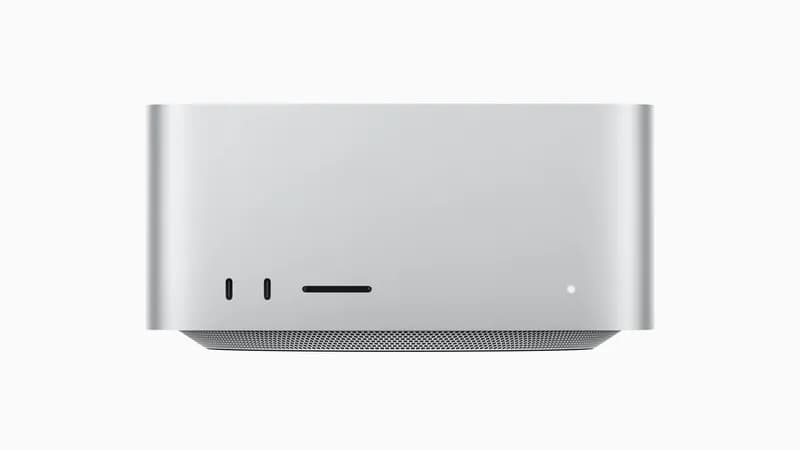
Path 1 — Mac Studio M4 Max 192 GB ($5,999)
The "just works" path. A maxed-out Mac Studio M4 Max with 192 GB of unified memory holds Q4_K_M (158 GB) plus 30+ GB of headroom for KV cache at 64K–128K context. Apple's MLX runtime now has first-class MoE expert routing as of MLX 0.24, and community benchmarks on r/LocalLLaMA report 25–35 tokens per second on V4-Flash via MLX.
Why this is most readers' answer:
- Single SKU, no build. Order it, plug it in,
brew install ollama, done. - 819 GB/s unified memory bandwidth is the dominant performance number. The MoE active-parameter framing means V4-Flash is bandwidth-bound on 13B, and 819 GB/s feeds 13B fast enough to keep the GPU saturated.
- 120W sustained wall power — under a tenth of a dual-RTX 5090 rig at the wall. No fan noise, no power-circuit planning.
- Full 1M context is viable with aggressive KV cache compression (8-bit KV reduces the 50 GB context overhead to ~25 GB).
Tradeoffs: no CUDA, so anything in the PyTorch ecosystem that hasn't been ported to MLX or Metal still matters. You can't fine-tune V4-Flash on a Mac Studio (you can do QLoRA on smaller models). And the $5,999 is the 192 GB SKU specifically — the 64 GB and 128 GB variants don't fit Q4_K_M with usable context. For the cross-platform tradeoff in detail, see our RTX 5090 vs Mac Studio M4 Max comparison and the spec page. The DGX Spark vs Mac Studio piece covers the workstation alternative.
Path 2 — RTX PRO 6000 96GB Workstation (~$11,000)
The pro-tier sweet spot, and the only single GPU that holds Q4_K_M V4-Flash entirely on-card. Build a workstation around an RTX PRO 6000 96GB plus a Threadripper 7960X or Ryzen 9 9950X, 256 GB of DDR5-6000 ECC, and a 1500W PSU. Total around $11,000 with the GPU at $9,500–$10,000 spot.
Performance: 45–60 tokens per second sustained at Q4_K_M. With the full 96 GB on-card, you can hold V4-Flash plus a generous KV cache for 128K–256K context without offload, and 1M context becomes viable with tight KV cache management (8-bit KV plus partial offload of cold cache to system RAM).
This is the build for anyone running V4-Flash as a production service — a coding agent for a small team, an internal RAG endpoint, a scheduled-batch inference job. The cost premium over Mac Studio buys you CUDA, fine-tuning capability (LoRA and full fine-tunes are practical), and the ability to also serve image-gen and video-gen workloads on the same card. Read our RTX PRO 6000 96GB review for the full benchmark suite, and the RTX PRO 5000 72GB comparison for the slightly cheaper workstation alternative — note the 72 GB card forces you to Q3_K_M for V4-Flash, which is a real quality step down.
Author note: Compute Market doesn't yet have full products.ts entries for the RTX PRO 6000 96GB or RTX PRO 5000 72GB — they appear in our blog reviews but aren't affiliate-linked products yet. We're flagging this as a follow-up; the cards are available at B&H and through workstation OEMs (Lambda, Puget, Boxx).
Path 3 — Dual RTX 5090 32GB ($5,500 + system)
The cheapest "mostly on-GPU" build, and the closest to a real engineering project. Two RTX 5090 cards at $1,999–$2,199 each, plus a workstation chassis with an HEDT or Threadripper-tier motherboard, 256 GB of DDR5-6000, and a 1600W PSU — roughly $5,500 for the GPUs and $2,500–$3,500 for the system, total $8K–$9K.
What you actually get: 64 GB of pooled fast VRAM, which is short of Q4_K_M's 96 GB requirement. You'll run Q3_K_M with 64 GB on-GPU and the rest streamed from system RAM via llama.cpp's --override-tensor flag. Expected throughput: 22–30 tokens per second on the active path with periodic stalls when the MoE router swaps expert sets across cards.
This is the right choice if you want CUDA, you want to also play with image-gen and video-gen models, and you're comfortable with NVLink-less multi-GPU plumbing. Our multi-GPU local LLM setup guide walks through the tensor-split, KV-cache-on-card-0, and PCIe lane-counting that this build needs. See also RTX 5090 vs RTX 3090 for the per-card $/VRAM math against the Path 4 build.
Path 4 — 4× Used RTX 3090 24GB (~$3,200 + system)
The value pick for anyone who's built mining rigs before. Four used RTX 3090 cards at $699–$999 each gives you 96 GB of pooled VRAM — exactly the Q4_K_M floor — for $2,800–$4,000 in cards. Add a server-grade chassis, dual EPYC or Threadripper, 1500W+ PSU, and PCIe risers; total build comes in around $5,500–$7,000.
Expected throughput: 18–25 tokens per second at Q4_K_M with NVLink pairs (the 3090 supports NVLink at 112 GB/s). Without NVLink the inter-card PCIe traffic on MoE expert swaps becomes the bottleneck and you'll see 12–18 tok/s.
This is honest about the build complexity. You're solving:
- Power: 4× 350W cards plus a CPU pulls 1,800W+ at the wall; you need a dedicated 20A circuit, not a regular outlet.
- Cooling: four blower-style or water-cooled 3090s, not the gaming-style triple-fan SKUs that won't fit two-deep in a workstation case.
- Used-market verification: mining-pulled cards are common; insist on receipts and run a 24-hour stress test before keeping them.
- Cabling: two NVLink bridges (~$80 each) are mandatory for usable performance.
Done right, this is the cheapest legitimately-on-GPU V4-Flash build. Done wrong, you have a $5K paperweight that crashes under load. Read our multi-GPU guide before committing.
Path 5 — Server-Class: H100 80GB or A100 80GB
For shops already running inference infrastructure. A pair of H100 PCIe 80GB cards at $25,000–$33,000 each runs Q5_K_M (200 GB) with NVLink and full 1M context comfortably. A pair of A100 80GB at $12,000–$15,000 each is the budget server-class alternative for Q4_K_M with overhead.
If you want this in a single chassis, the Supermicro SYS-421GE-TNRT at $8,000–$15,000 (barebones) is the standard 4U platform that takes 8× H100 or A100 and serves the V4-Flash + V4-Pro combination with NVLink switches.
This is the path for a company self-hosting V4-Flash as an internal-API replacement for OpenAI/Anthropic — the per-token math at scale (10K+ tokens/second sustained) collapses the API bill faster than the hardware depreciation curve. For single-user buyers, Paths 1–4 are correct; this path exists for completeness. See H100 vs A100 spec page for the per-card tradeoff.
Don't Bother — Hardware That Cannot Reasonably Run V4-Flash
Equally important to know what not to buy. The 90 GB pooled-memory cutoff is hard. Below it, V4-Flash is a benchmark exercise, not a production model.
| Hardware | Why It Fails | Better Use For |
|---|---|---|
| RTX 5060 Ti 16GB | 16 GB is 11% of Q4_K_M needs. Running V4-Flash means streaming 140+ GB from NVMe per generation step. Sub-2 tok/s. | Qwen 3-7B, Gemma 4-9B, Phi-4 14B |
| RTX 4090 24GB single-card | 24 GB is short by a factor of four. Even IQ2_XS doesn't fit on-card; CPU offload dominates and tok/s collapses. | Qwen 3.6-A3B, dense 70B at Q4 with offload |
| Mac Mini M4 Pro 48GB | 48 GB is half of the IQ2 floor. Sub-IQ2 quants are below the quality cliff where V4-Flash starts writing broken function names. | Llama 4 Scout 8B, Gemma 4 9B |
| Mac Studio M4 Max 64GB / 128GB | 64 GB can run IQ2_XS at the absolute edge with no headroom; 128 GB is fine for IQ2 but tight for Q3 with context. | Llama 4 70B, Qwen 3-72B at Q4 — see Qwen 3-72B hardware |
| Single H100 80GB | 80 GB single-card can't quite hold Q4_K_M (158 GB on disk → ~96 GB at runtime with weight-only quant) and there's no second card to spill to. | Pair with another H100 (Path 5), or run Q3_K_M with system RAM offload at reduced speed. |
The hard cutoff: below 90 GB of pooled VRAM or unified memory, V4-Flash is a benchmark exercise, not a production model. If your budget is below the Mac Studio 192 GB / dual-5090 / quad-3090 tier, you don't want V4-Flash — you want Qwen 3.6-A3B (3B active, fits on a 24 GB GPU), Llama 4 Scout 8B (dense, fits in 16 GB), or Gemma 4 9B (dense, fits in 16 GB). All three are excellent and cost a quarter of what V4-Flash hardware costs. The AI on a budget hub covers cheaper entry points; our cheapest 32 GB GPU guide covers the next tier up.
V4-Flash vs V4-Pro — Why Most Self-Hosters Should Ignore Pro
DeepSeek V4-Pro is a 1 trillion parameter dense-routed MoE — roughly 3.5× V4-Flash's total weights and ~6× the active parameters per token. It is genuinely competitive with Claude Sonnet 4.6 on coding and reasoning benchmarks, and DeepSeek's API serves it at $0.55 / 1M input tokens.
| Model | Total Params | Active | Min Local Hardware | 2026 Self-Host? |
|---|---|---|---|---|
| V4-Flash | 284B | ~13B | 96 GB pooled (Mac Studio 192 GB / RTX PRO 6000) | Yes — canonical local model |
| V4-Pro | ~1T | ~75B | 8× H100 80GB minimum (~$200K+) | No — API only |
For 99% of readers, V4-Pro is an API tier. Pay $0.55/1M for the few hard cases, run V4-Flash locally for the flow-state work. We expect this to flip in 2027 when 256 GB workstation cards land and quad-card workstations become routine — at that point V4-Pro at Q3 becomes a workstation model — but in 2026, V4-Flash is the local target and V4-Pro is something you call.
Software Stack — What Actually Runs Today (April 26, 2026)
The runtime situation is moving daily. Here's the snapshot as of April 26:
- vLLM — day-one support. DeepSeek's release post explicitly lists vLLM 0.9.x as the reference inference server for V4-Flash; the model card includes a working
--model deepseek-ai/DeepSeek-V4-Flash --tensor-parallel-size 4example. This is the pick for server-class deploys (Path 5) and most multi-GPU workstations (Path 3, Path 4). - llama.cpp — community patches working, no merged release yet. GitHub issue #22319 ("Model request: DeepSeek V4 Series") has working forks; expect a merged release within the week. Use the community GGUF for now if you want llama.cpp / Ollama compatibility — see our Ollama setup guide for the runtime basics.
- MLX — port underway, expert routing functional. The MLX team merged MoE expert routing in MLX 0.24 (April 22) and a community port of V4-Flash to MLX format is up at
mlx-community/DeepSeek-V4-Flash-4bit-mlx. This is the pick for the Mac Studio path. - Ollama — pulls the community GGUF.
ollama pull deepseek-v4-flash:q4works as of April 26 against the community upload; expect official tags within days. - Hugging Face Transformers — supported. Day-one support for PyTorch / Transformers; useful for fine-tuning experiments but not the right runtime for production inference (use vLLM).
What to install today, by platform:
- Mac Studio:
pip install mlx-lm+ community MLX port, orbrew install ollama+ community GGUF. - RTX PRO 6000 / dual-5090: vLLM 0.9.x with
--quantization fp8for the official weights, or llama.cpp with the community GGUF for offload-heavy configurations. - 4× 3090: llama.cpp with NVLink-aware tensor-split. vLLM works but its expert-parallel mode is less mature than its tensor-parallel mode for the 4× consumer-card case.
- H100/A100 server: vLLM with
--tensor-parallel-size 4or8, FP8 weights for the H100 path.
MIT License — What You Can Actually Do
DeepSeek V4-Flash ships under the MIT license. The license file is in the model's Hugging Face repo and reads exactly like the React or Node.js MIT license. In plain English, you can:
- Deploy it commercially as a product or internal service, with no royalty.
- Fine-tune it on proprietary data and ship the resulting model in your product without contributing the fine-tune back.
- Redistribute the weights — you can mirror the model on your own infrastructure or bundle it with hardware you sell.
- Embed it in proprietary software with no license-compatibility issues. MIT plays cleanly with GPL, BSD, Apache 2.0, and proprietary licenses.
What you must do: include the copyright notice and license text in any redistribution. That's the entire compliance burden.
This is materially different from Llama 4's community license (which has acceptable-use restrictions and a 700M-MAU revenue trigger) and from Gemma's license (which has its own usage restrictions). For SMB buyers evaluating self-hosted V4-Flash as a Claude Haiku-tier replacement on legal/compliance terms, MIT is the cleanest possible answer.
The 18-Month Forecast — Will Your V4-Flash Rig Hold Up?
Open-weights model trajectories through 2027 — Qwen 4 (announced internal target Q3 2026), Llama 5 (rumored late 2026), DeepSeek V5 (no announcement, ~12-month cycle from V4) — all point at 200B–500B total / 15B–30B active MoE shapes. None of them push past the 96–128 GB pooled-memory floor that V4-Flash establishes. Frontier dense models (Llama 4-Behemoth, V4-Pro) keep climbing, but the local-target tier appears to have stabilized.
The implication: 96–128 GB of pooled fast memory is the new floor for frontier open-weights through 2027. The rig you build for V4-Flash today is the rig you'll run the next four model releases on. That changes the buy-now math — you're not just buying for V4-Flash, you're buying the hardware budget for the open-weights ecosystem through end of 2027.
If you're choosing between buying now and waiting for next-gen workstation cards (RTX PRO 7000 rumored 128 GB at GTC 2027): buy now if your workload is real, wait if you're experimenting. The 96 GB floor is durable enough that the cards we cover above don't depreciate fast.
Bottom Line — What to Buy for DeepSeek V4-Flash
| Your Situation | Buy This | Total Cost | Expected Experience |
|---|---|---|---|
| Mac-native developer, just want it to work | Mac Studio M4 Max 192 GB | $5,999 | Q4_K_M @ 25–35 tok/s, silent, 1M context viable |
| Production agent for a small team | RTX PRO 6000 96GB workstation | ~$11,000 | Q4_K_M @ 45–60 tok/s, on-card, fine-tuning possible |
| CUDA-required, willing to engineer | 2× RTX 5090 + 256 GB DDR5 | ~$8,500 | Q3_K_M @ 22–30 tok/s, also runs everything else |
| Home-lab builder, budget-conscious | 4× used RTX 3090 + NVLink | ~$6,000 | Q4_K_M @ 18–25 tok/s, real engineering project |
| Already running inference infra | 2× H100 PCIe 80GB in Supermicro chassis | $60K+ | Q5_K_M @ 60–90 tok/s, full 1M context, fine-tuning |
| Budget under $4K | Don't buy for V4-Flash — buy for Qwen 3.6-A3B instead | $1,500–$3,500 | Different model, same license tier, real local AI |
For most readers landing on this page from a Google search, the answer is one of two things. If you live in the Apple ecosystem and don't need CUDA, the Mac Studio M4 Max 192 GB at $5,999 is correct — it's the cheapest single-SKU configuration that runs V4-Flash at recommended quality with no engineering overhead. If you need CUDA, want fine-tuning, or are running V4-Flash as a service, the RTX PRO 6000 96GB workstation at ~$11,000 is correct — it's the cheapest configuration where everything just works on-card.
For the full landscape, see our AI GPU buying guide and the local LLM guide hub. Predecessor context: DeepSeek R1 local setup and the broader open-weights series — Qwen3-Coder-Next, Llama 4, Gemma 4. If GPU prices have moved since this post, our 2026 DRAM shortage piece tracks the current spot market; for the lower tier, cheapest 32 GB GPU is the entry point. And if you're shopping mini-PCs that don't run V4-Flash but might run smaller MoE models well, our mini PC for AI hub is the right next stop.
Frequently Asked Questions
What's the minimum hardware to run DeepSeek V4-Flash locally?
Roughly 90 GB of pooled VRAM or unified memory at IQ2_XS, ~96 GB for a comfortable Q4_K_M, and ~125 GB for Q3_K_M with reasonable headroom. Below 90 GB you are paging V4-Flash from disk and the model is unusable for production work. The cheapest configurations that clear the bar are a 192 GB Mac Studio M4 Max, a single RTX PRO 6000 96GB, two RTX 5090 plus aggressive CPU offload, or four used RTX 3090 with NVLink pairs.
Why does DeepSeek V4-Flash's 13B active parameter count matter more than the 284B total?
V4-Flash is a Mixture of Experts model: only ~13B of the 284B parameters activate for any given token. Tokens-per-second is bandwidth-limited on the 13B active set, not the 284B total. That is why a Mac Studio M4 Max at 819 GB/s of unified bandwidth keeps up with a dual RTX 5090 rig despite half the raw FLOPs — both are bottlenecked on moving the active 13B per token. The 284B figure only sets capacity (how much memory you need to hold the weights), not speed.
Can a single RTX 5090 run DeepSeek V4-Flash?
Not usefully on its own. A single RTX 5090 has 32 GB of VRAM — far short of the ~96 GB needed for Q4_K_M. You can technically stream experts from system RAM at IQ2 with 128 GB+ DDR5, but expect 2–4 tokens per second on the active path and frequent stalls when the router swaps expert sets. For meaningful local V4-Flash performance on consumer hardware, you need two RTX 5090 with CPU offload at Q3_K_M or a single 96 GB workstation card.
Is DeepSeek V4-Flash actually MIT-licensed for commercial use?
Yes. DeepSeek-AI released V4-Flash on April 24, 2026 under the MIT license — the same license that covers React, Node.js, and most modern open-source software. It permits commercial deployment, fine-tuning, redistribution, and embedding in proprietary products with no royalty and no use restrictions. This is the most permissive license of any frontier-tier 2026 open-weights model — Llama 4's community license has acceptable-use carve-outs that V4-Flash does not.
Should I buy hardware for V4-Flash or wait for V4-Pro?
Buy for V4-Flash. V4-Pro is a 1 trillion parameter dense-routed MoE that requires 8× H100 80GB minimum to run usefully — roughly $200,000 of hardware. It is not a self-hosting target in 2026. V4-Flash is the canonical local model in the V4 family and almost certainly the model you'll run for the next 18 months. A 96–128 GB pooled-memory rig built for V4-Flash today will also run Qwen 4, Llama 5, and the next DeepSeek release without modification.