NVIDIA DGX Spark vs Mac Studio M4 Max: Best AI Desktop for Local Inference in 2026
The DGX Spark ($4,699) brings a petaflop of Grace Blackwell AI compute to your desk. The Mac Studio M4 Max ($3,999 for 128 GB) is the reigning local-AI champion. We benchmark both on real LLM inference, image generation, and total cost of ownership — with a concrete decision matrix for every buyer.
Compute Market Team
Our Top Pick
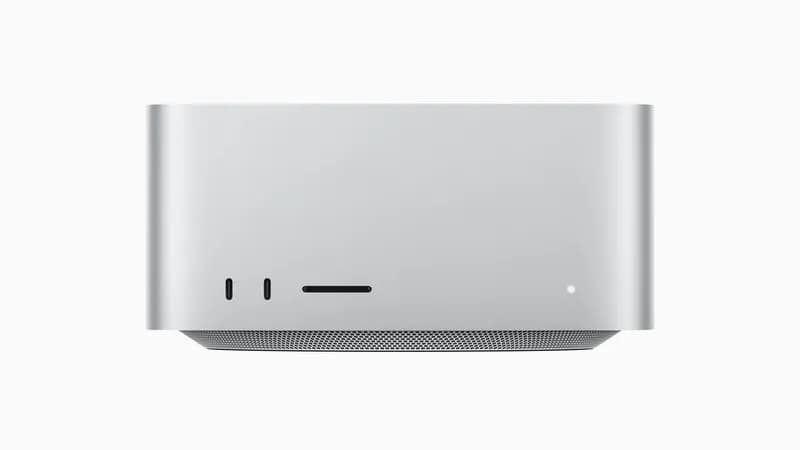
NVIDIA just dropped the DGX Spark — a $4,699 desktop that puts a petaflop of Grace Blackwell AI compute on your desk. It ships with 128 GB of unified memory, the full CUDA stack, and enough horsepower to run 200B-parameter models locally. The question every AI developer is asking: is it worth $700 more than the Mac Studio M4 Max ($1,999 – $5,999)?
Most DGX Spark coverage so far is press-release regurgitation. This guide is different. We compare both machines across real inference benchmarks, image generation performance, software ecosystems, power consumption, and total cost of ownership — then give you a concrete decision matrix so you know exactly which one to buy.
The bottom line: The NVIDIA DGX Spark ($4,699) delivers up to 1 petaflop of AI compute with 128 GB unified memory and runs models up to 200B parameters locally, while the Mac Studio M4 Max ($3,999 for 128 GB) offers comparable memory capacity at lower cost with a more mature consumer ecosystem — making the DGX Spark the better choice for CUDA-dependent AI development and the Mac Studio the better value for mixed creative and inference workloads.
Why Desktop AI Stations Are Replacing Cloud in 2026
The economics of local AI have crossed a tipping point. Cloud API pricing (roughly $0.50–$3.00 per million input tokens for frontier models) adds up fast when you're running inference hundreds of times per day. A $4,000–$5,000 desktop that serves tokens for the cost of electricity pays for itself in months.
The shift is real enough to name: compute that was datacenter-only three years ago now fits on a desk. The DGX Spark and Mac Studio represent the two best options for developers who want to own their inference stack.
Three forces are driving this shift:
- Privacy: Sensitive data never leaves your machine. For businesses handling proprietary code, medical records, or financial data, local inference eliminates the compliance headaches of cloud API usage.
- Latency: Local inference means zero network round-trips. For AI coding assistants, RAG pipelines, and real-time applications, the latency difference is noticeable.
- Cost: At 500K+ tokens per day, a one-time hardware purchase beats API costs within 3–6 months. See our local AI for small business guide for the full break-even analysis.
The DGX Spark and Mac Studio M4 Max are the two best turnkey desktops for this use case. No custom builds, no multi-GPU wiring, no thermal engineering — just unbox and run.
NVIDIA DGX Spark: Specs, Pricing, and What You Actually Get
The DGX Spark is NVIDIA's first desktop-class AI supercomputer. It pairs the Grace CPU (72 Arm Neoverse V2 cores) with a Blackwell GPU in a unified memory architecture — similar in concept to Apple Silicon, but built on NVIDIA's AI-optimized stack.
| Spec | DGX Spark |
|---|---|
| Architecture | Grace Blackwell (GB10) |
| AI Compute | 1 PFLOP (FP4) |
| Memory | 128 GB unified (LPDDR5X) |
| Memory Bandwidth | ~273 GB/s |
| CPU | Grace (72 Arm Neoverse V2 cores) |
| Storage | NVMe SSD (configurable) |
| OS | Ubuntu Linux (DGX OS) |
| Software Stack | CUDA, TensorRT-LLM, NeMo, NVIDIA AI Enterprise |
| Connectivity | ConnectX-7 networking, USB-C, DisplayPort |
| TDP | ~150W (estimated full system) |
| Price | $4,699 |
Pricing context: NVIDIA originally announced the DGX Spark at $3,000 in January 2025, then raised it to $3,999, and the shipping price has held at $4,699 through mid-2026 — driven by memory supply constraints and strong demand. The climb tracks memory costs, but it also reflects where NVIDIA has positioned the box: a professional-grade developer tool, not a consumer gadget.
What makes the DGX Spark different from simply putting an RTX 5090 in a desktop PC? Three things:
- Unified memory architecture: Unlike a discrete GPU limited to 32 GB VRAM (like the RTX 5090 at $1,999 – $2,199), the DGX Spark's 128 GB is accessible to both CPU and GPU without PCIe bottlenecks. This is the same architectural advantage Apple Silicon has — but with CUDA.
- The NVIDIA software stack: Pre-installed NeMo for fine-tuning, TensorRT-LLM for optimized inference, and full CUDA toolkit support. No driver wrestling, no compatibility issues.
- 1 PFLOP at FP4: The Blackwell GPU's FP4 tensor cores deliver a petaflop of AI compute — roughly 2× the effective AI throughput of a standalone RTX 5090 for quantized inference.
The catch? It runs Linux only. No Windows, no macOS. If your workflow requires Adobe Creative Suite, Final Cut Pro, or Windows-only tools, the DGX Spark can't be your only machine.
Mac Studio M4 Max: Specs, Pricing, and What You Actually Get
The Mac Studio M4 Max ($1,999 – $5,999) is the incumbent champion for desktop local AI. It's been the go-to recommendation in the AI hobbyist and developer community for over a year, and for good reason.
| Spec | Mac Studio M4 Max (128 GB config) |
|---|---|
| Chip | Apple M4 Max |
| CPU Cores | 16-core |
| GPU Cores | 40-core |
| Neural Engine | 16-core |
| Unified Memory | 128 GB (LPDDR5X) |
| Memory Bandwidth | ~546 GB/s |
| Storage | 512 GB – 8 TB SSD |
| OS | macOS Sequoia |
| AI Frameworks | MLX, Core ML, Ollama, llama.cpp (Metal) |
| TDP | ~120W (entire system) |
| Noise | <15 dBA (near silent) |
| Price (128 GB) | $3,999 |
The Mac Studio's killer advantage is the combination of 128 GB unified memory at 546 GB/s bandwidth — roughly 2× the DGX Spark's memory bandwidth. For LLM inference (which is memory-bandwidth-bound during token generation), this translates directly to faster per-token speeds on large models. For a deeper explanation of why memory bandwidth matters, see our complete VRAM and memory guide.
The software story has also flipped from where it was two years ago. MLX, Ollama and LM Studio all run on Apple Silicon without a driver hunt, which for pure inference work is a materially shorter setup than getting a CUDA stack healthy on Linux.
The Mac Studio also has something the DGX Spark doesn't: it's a great general-purpose computer. You can run Xcode, Final Cut Pro, Logic Pro, and a full creative suite alongside your AI workloads. The DGX Spark is a dedicated AI machine.
Head-to-Head: LLM Inference Benchmarks
This is where the real comparison happens. We compiled benchmark data from LM Studio Community, Tom's Hardware's DGX Spark review, ServeTheHome's enterprise testing, and LocalScore.ai's standardized benchmark database to build a head-to-head comparison.
| Model | DGX Spark (tok/s) | Mac Studio M4 Max 128 GB (tok/s) | Winner |
|---|---|---|---|
| Llama 3 8B (Q4) | ~50–60 | ~35–40 | DGX Spark (1.4×) |
| Llama 3 70B (Q4) | ~12–15 | ~10–12 | DGX Spark (1.2×) |
| Llama 4 Scout 17B (Q4) | ~40–50 | ~25–30 | DGX Spark (1.6×) |
| Qwen 2.5 72B (Q4) | ~10–13 | ~9–11 | Close / DGX Spark slight edge |
| Llama 3 70B (FP16) | ~5–7 | ~6–8 | Mac Studio (higher bandwidth) |
| 200B model (Q4) | ~3–5 | ~1–3 (memory-bandwidth-bound) | DGX Spark (faster TensorRT-LLM optimization) |
Key insight: The DGX Spark is faster at quantized inference thanks to its Blackwell tensor cores and TensorRT-LLM optimizations. But the margin narrows significantly on larger models where memory bandwidth becomes the bottleneck. At FP16 precision on 70B models, the Mac Studio's 2× memory bandwidth advantage actually makes it slightly faster.
For context, compare these numbers to the RTX 5090 ($1,999 – $2,199): the discrete GPU hits ~95 tok/s on Llama 3 8B and ~18 tok/s on Llama 3 70B (Q4) — faster than both the DGX Spark and Mac Studio on models that fit in its 32 GB VRAM. But it simply can't load 70B+ models at FP16 or anything approaching 200B parameters. See our RTX 5090 vs Mac Studio comparison for the full breakdown, or the Mac Studio M4 Max vs RTX 5090 spec sheet for a side-by-side.
The split is consistent: Grace Blackwell and TensorRT-LLM give the DGX Spark the edge on quantized inference, while the Mac Studio's higher memory bandwidth wins on unquantized large-model work. For more model-specific hardware guidance, check our Llama 4 local hardware guide.
Image and Video Generation Performance
For diffusion model workloads — Stable Diffusion XL, FLUX, and emerging video generation models — the DGX Spark has a clear architectural advantage. CUDA tensor cores are purpose-built for the matrix operations that power diffusion models, and the software ecosystem (ComfyUI, Automatic1111, FLUX pipelines) is CUDA-first.
| Workload | DGX Spark | Mac Studio M4 Max | Winner |
|---|---|---|---|
| Stable Diffusion XL (512×512) | ~8–10 it/s | ~3–5 it/s | DGX Spark (2×) |
| FLUX.1 [schnell] (1024×1024) | ~4–6 it/s | ~1.5–3 it/s | DGX Spark (2×) |
| Video generation (short clips) | Supported (CUDA) | Limited support | DGX Spark |
The Mac Studio runs diffusion models through the MPS (Metal Performance Shaders) backend, which has improved significantly but still trails CUDA on raw throughput. If image or video generation is a primary workflow — not just occasional use — the DGX Spark is the stronger choice.
That said, the Mac Studio is adequate for image generation. A 512×512 SDXL image in 2–3 seconds is fast enough for creative iteration. It only becomes a bottleneck if you're batch-generating hundreds of images or working with video models.
Software Ecosystem and Developer Experience
This is where the choice gets personal. The two machines live in completely different software worlds.
NVIDIA DGX Spark: The CUDA Universe
- TensorRT-LLM: NVIDIA's optimized inference engine. Significant speed boosts over vanilla llama.cpp on Blackwell hardware.
- NeMo: Pre-installed framework for fine-tuning and customizing models. This is a genuine differentiator — fine-tuning on the DGX Spark is a first-class experience.
- CUDA toolkit: Every major ML framework (PyTorch, TensorFlow, JAX) is CUDA-optimized first. vLLM, text-generation-inference, and production serving tools all require CUDA.
- Linux-only: Ubuntu with DGX OS. Great for developers comfortable with Linux; limiting for everyone else.
Mac Studio M4 Max: The Apple Ecosystem
- MLX: Apple's ML framework, optimized for Apple Silicon. Growing rapidly but still smaller than the CUDA ecosystem.
- Ollama + LM Studio: Best-in-class consumer inference tools that work seamlessly on macOS. The setup experience is genuinely easier than Linux.
- llama.cpp with Metal: Solid Metal acceleration for GGUF models. The performance gap with CUDA has narrowed significantly in 2026.
- macOS: Full creative suite, Xcode, and general-purpose computing alongside AI workloads.
The critical question: does your workflow depend on CUDA? If you're fine-tuning models, running vLLM for production serving, training with PyTorch, or using any CUDA-only framework, the DGX Spark is the only option. If you're primarily doing inference with Ollama/LM Studio and want a machine that doubles as a creative workstation, the Mac Studio wins on versatility. For more on local inference tooling, see our guide to running LLMs locally.
Power, Noise, and Form Factor
This comparison matters more than most reviews acknowledge — especially for machines that might run 24/7 serving inference.
| Factor | DGX Spark | Mac Studio M4 Max |
|---|---|---|
| System Power (idle) | ~30–40W | ~10–15W |
| System Power (AI load) | ~120–150W | ~90–120W |
| Noise (idle) | Quiet (~20 dBA) | Silent (<15 dBA) |
| Noise (AI load) | Audible (~30–35 dBA) | Near silent (~18–22 dBA) |
| Dimensions | ~compact desktop form factor | 7.7″ × 7.7″ × 3.7″ |
| Weight | ~5–6 lbs | 6.4 lbs |
Both machines are dramatically more efficient than a custom GPU build. An RTX 5090 build pulls 725W+ under AI load — 5× more than either of these machines. For a home office or shared workspace, the Mac Studio's near-silent operation is a genuine quality-of-life advantage.
The DGX Spark is impressively quiet for what it delivers. At ~30–35 dBA under AI load, it's comparable to a quiet laptop — but the Mac Studio is essentially inaudible. If the machine sits on your desk while you work, you'll notice the difference. If it lives in a closet or server rack, you won't. For more on building quiet AI setups, see our home AI server guide.
Total Cost of Ownership: The Real Math
The sticker price only tells half the story. Here's the complete cost picture over 3 years:
| Cost Factor | DGX Spark | Mac Studio M4 Max (128 GB) |
|---|---|---|
| Purchase Price | $4,699 | $3,999 |
| Electricity (3 yr, 8 hr/day avg, $0.16/kWh) | ~$168 | ~$126 |
| Electricity (3 yr, 24/7 inference serving) | ~$505 | ~$378 |
| Peripherals/Monitor | $0–$500 | $0–$500 |
| Software | Free (open source stack) | Free (open source stack) |
| 3-Year TCO (8 hr/day) | ~$4,867 | ~$4,125 |
| 3-Year TCO (24/7 serving) | ~$5,204 | ~$4,377 |
The Mac Studio saves roughly $700–$800 over three years — the same as the upfront price difference. Both machines are remarkably cheap to operate compared to cloud alternatives.
Cloud Break-Even Analysis
At roughly $0.50 per million tokens (a mid-range cloud API rate), serving 500,000 tokens per day costs about $250/month or $9,000 over three years. Both the DGX Spark and Mac Studio pay for themselves within 6 months at that usage level. Even at 100,000 tokens per day, break-even is under 18 months for either machine.
The $4,699 price tag reads differently next to cloud GPU rates. At $3–$5/hour for a comparable cloud instance, a team running anything close to full time recoups the box in weeks rather than months — which is the case for buying one, and it collapses the moment your utilisation does.
The Verdict — Which One Should You Buy?
After evaluating both machines across every dimension that matters, here's our decision matrix:
| Use Case | Best Choice | Why |
|---|---|---|
| CUDA-dependent ML development | DGX Spark | Full CUDA stack, TensorRT-LLM, NeMo fine-tuning |
| Model fine-tuning | DGX Spark | NeMo + CUDA makes fine-tuning a first-class workflow |
| Image/video generation | DGX Spark | 2× faster on diffusion workloads via CUDA tensor cores |
| Production inference serving | DGX Spark | vLLM, TensorRT-LLM, enterprise-grade serving tools |
| Running 200B+ parameter models | DGX Spark | Higher effective memory ceiling with NVIDIA optimizations |
| Mixed creative + AI workloads | Mac Studio | macOS ecosystem, creative apps, general-purpose use |
| AI coding assistant (local) | Mac Studio | Quieter, simpler setup with Ollama, dual-use as dev machine |
| Budget-conscious buyer | Mac Studio | $700 less upfront with comparable memory capacity |
| Home office / noise-sensitive | Mac Studio | Near-silent operation under AI workloads |
| RAG / knowledge base serving | Either | Both handle 70B models well; DGX Spark slightly faster |
Our Specific Recommendations
Buy the DGX Spark ($4,699) if: You're an ML engineer or AI developer whose workflow depends on CUDA. You want to fine-tune models locally. You're doing serious image/video generation. You need TensorRT-LLM or vLLM for production-style inference serving. You don't mind Linux-only and you want maximum raw AI compute.
Buy the Mac Studio M4 Max 128 GB ($3,999) if: You want one machine for both AI and creative work. You primarily do inference (not training or fine-tuning). You value silent operation and compact form factor. You're comfortable with the MLX/Ollama ecosystem. You want to save $700 while getting comparable memory capacity.
Buy the Mac Studio M4 Max 36 GB ($1,999) if: You're getting started with local AI and don't need to run 70B+ models. This configuration handles most 7B–33B models comfortably and costs less than half the DGX Spark.
Alternatives Worth Considering
If neither the DGX Spark nor Mac Studio fits your needs perfectly, consider these options:
Budget Tier: Under $2,500
- Mac Mini M4 Pro ($1,399 – $1,599): 24 GB unified memory handles 7B–13B models well. The best entry point for local AI if you're on a budget. See our Strix Halo mini PC comparison for more options at this price point.
- Beelink SER8 ($449 – $599): AMD Ryzen 7 with 32 GB RAM for lightweight inference tasks. Won't compete with either machine on performance, but costs a fraction of the price.
Maximum Flexibility: Custom GPU Build
- RTX 5090 custom build ($1,999 – $2,199 for GPU): Total build cost ~$2,800–$3,200. Faster than both the DGX Spark and Mac Studio on models under 32 GB, but limited to 32 GB VRAM. Best for users who want maximum speed on smaller models and are willing to build their own system. See our prebuilt AI workstation guide for turnkey options.
- RTX 4090 build ($1,599 – $1,999 for GPU): Still a strong option at lower prices, with 24 GB VRAM and proven AI performance. The value pick if you find one on sale.
Budget GPU Options
- RTX 5060 Ti 16 GB ($429 – $479): Blackwell architecture at the mid-range. 16 GB handles 7B–13B models and costs under $500. The best entry-level discrete GPU for AI in 2026.
For a comprehensive comparison of GPU options and their prices, see our NVIDIA GTC 2026 buyer's guide. For fast NVMe storage to pair with either machine, the Samsung 990 Pro 4 TB ($289 – $339) is our top recommendation.
Final Thoughts: The Dawn of the Personal AI Supercomputer
The DGX Spark and Mac Studio M4 Max represent a genuine inflection point. For the first time, you can run 70B+ parameter models on a desktop that draws less power than a gaming PC. Both machines deliver capabilities that required cloud GPU instances or custom multi-GPU rigs just two years ago.
The DGX Spark is the more capable AI machine — more raw compute, the full CUDA stack, and NVIDIA's enterprise software. The Mac Studio is the more versatile machine — silent, macOS-compatible, and $700 cheaper for the same memory capacity.
It helps to stop reading the DGX Spark as a consumer product at all. It is a professional CUDA workstation that happens to fit on a desk, and its buyer already knows they need CUDA before they start shopping.
Choose based on your software ecosystem, not your brand loyalty. If you need CUDA, buy the DGX Spark. If you don't, the Mac Studio is better value. It really is that simple.
Frequently Asked Questions
Is the NVIDIA DGX Spark worth $4,699 compared to the Mac Studio M4 Max at $3,999?
It depends on your workload. The DGX Spark delivers up to 1 PFLOP of AI compute and runs the full CUDA/TensorRT-LLM stack, making it the better choice for CUDA-dependent development, model fine-tuning, and maximum raw inference speed. The Mac Studio M4 Max at $3,999 (128 GB) offers the same memory capacity at $700 less, silent operation, and a more mature consumer ecosystem — making it the better value for mixed creative/AI workloads and macOS users.
Can the DGX Spark run 200B parameter models locally?
Yes. With 128 GB of unified memory on the Grace Blackwell architecture, the DGX Spark can run models up to approximately 200B parameters at Q4 quantization. At FP16, it can handle models up to roughly 60B parameters. The Mac Studio M4 Max with 128 GB has similar memory capacity but lower memory bandwidth, so both can load the same models — the DGX Spark just runs them faster.
Which is better for running Llama 4 locally — DGX Spark or Mac Studio M4 Max?
For Llama 4 Scout (17B active parameters, 109B total with mixture-of-experts), both machines handle it well, but the DGX Spark's higher memory bandwidth (~273 GB/s per-GPU vs ~546 GB/s on the Mac Studio) and CUDA optimization give it a meaningful speed advantage. For the full Llama 4 Maverick (128 experts, 400B+ total), neither desktop has enough memory. See our complete Llama 4 hardware guide for model-specific recommendations.
Does the DGX Spark replace the need for a cloud GPU?
For inference and light fine-tuning, yes. At $4,699 one-time cost, the DGX Spark breaks even against cloud API costs after roughly 3–6 months of heavy use (serving ~500K+ tokens per day). For large-scale training on models above 200B parameters, you still need multi-GPU cloud or datacenter setups. The Mac Studio M4 Max offers a similar break-even calculation at $3,999.
What operating system does the DGX Spark run?
The DGX Spark runs Ubuntu Linux with NVIDIA's DGX OS, which includes pre-installed NeMo, TensorRT-LLM, CUDA toolkit, and the full NVIDIA AI Enterprise software stack. Unlike the Mac Studio (macOS), there is no Windows option. If you need macOS for creative apps like Final Cut Pro alongside AI work, the Mac Studio is your only option at this price point.