Best Pre-Built AI Workstation in 2026: 7 Machines Ranked by Real Workloads
We ranked 7 pre-built AI workstations by GPU power, VRAM, price, and real AI workload performance. Mac Studio M4 Max, BOXX APEXX, Puget Systems, Lambda Hyperplane, and more — tested and compared so you can skip the build and start training.
Compute Market Team
Our Top Pick
Last updated: September 13, 2026. Prices reflect current retail and configured pricing from manufacturer websites. Benchmark data sourced from Puget Systems, Lambda, Tom's Hardware, and our own testing.
The Best Pre-Built AI Workstation Is the One Running Tomorrow
The best pre-built AI workstation in 2026 is the Puget Systems Peak for professional single-GPU work and the Mac Studio M4 Max for silent, zero-configuration AI inference. Both ship tested, validated, and ready to run models out of the box — no driver debugging, no thermal throttling surprises, no DOA component returns.
Pre-built matters more in AI than in gaming or general computing. AI workloads push hardware to sustained 100% utilization for hours or days at a time. A misconfigured cooling solution, an undersized PSU, or a motherboard BIOS incompatibility does not just cause a stutter — it kills a training run 18 hours in. The most expensive component in any sustained-compute build is downtime, and a validated system is one where someone else has already eliminated the common causes of it.
Professional workstation vendors like Puget Systems, BOXX, and Lambda test every component combination under sustained AI workloads before shipping. They run burn-in tests, validate driver compatibility, tune BIOS settings for multi-GPU configurations, and provide direct engineering support when something goes wrong. That is not a luxury — it is the difference between deploying your model on Tuesday and spending your week on Reddit troubleshooting PCIe lane allocation.
If you prefer the DIY route and want to maximize value, we have a full build guide: How to Build Your First AI Workstation (Step-by-Step). But if your time is worth more than the 15–30% markup on a pre-built, keep reading.
Quick Picks: 7 Machines Ranked
| Machine | Starting Price | GPU | VRAM | Best For |
|---|---|---|---|---|
| Mac Studio M4 Max | $3,999 | M4 Max (40-core GPU) | 128GB unified | Silent inference, 70B models, plug-and-play |
| Supermicro GPU Server | $8,000 (barebones) | Up to 8x NVIDIA GPUs | Up to 640GB HBM3 | Enterprise multi-GPU training at scale |
| Razer Blade 16 | $4,699+ | RTX 5080 Laptop (16GB) | 16GB GDDR7 | Portable AI development on the go |
| BOXX APEXX S3 | $5,200 | RTX 5090 (32GB) | 32GB GDDR7 | Single-GPU creative + AI workflows |
| Puget Systems Peak | $6,500 | RTX 5090 (32GB) | 32GB GDDR7 | Professional workloads, best support in class |
| Lambda Hyperplane | $22,000 | Up to 4x RTX 6000 Ada | Up to 192GB GDDR6 | Multi-GPU training and fine-tuning |
| Beelink SER8 | $559 | Integrated (Ryzen AI) | Shared system RAM | Budget entry, 7B models, edge inference |
Quick Answer
Best overall: Puget Systems Peak with RTX 5090 — best support, validated hardware, quiet under load. Best value: Mac Studio M4 Max — runs 70B models in a silent box for under $4,000. Best budget: Beelink SER8 — serious AI experimentation for $559.
What to Look for in a Pre-Built AI Workstation
GPU: The Single Most Important Component
Your GPU determines which models you can run, how fast inference completes, and whether fine-tuning is feasible. Capacity is the spec that sets your ceiling — it decides which models load at all, while tensor cores and memory bandwidth decide how fast they run. For pre-builts, look for at least 24GB VRAM (RTX 4090 or RTX 5090). Anything under 16GB will feel limiting within months as model sizes continue growing. For a deep dive on GPU selection, see our Best GPU for AI in 2026 guide or the AI GPU buying guide hub.
System RAM vs. VRAM: Two Different Bottlenecks
System RAM (DDR5) and GPU VRAM (GDDR7 or HBM) serve different purposes. VRAM holds the model weights during inference. System RAM holds your OS, datasets, preprocessing pipelines, and anything that feeds data to the GPU. For AI workloads, 64GB of system RAM is the minimum for serious work. 128GB is recommended if you work with large datasets or run multiple models simultaneously. Do not confuse the two — a machine with 128GB of system RAM and 8GB of VRAM cannot run a 30B model.
Cooling: Sustained Workloads Are Not Gaming
Gaming stresses a GPU in bursts. AI training and inference hammer it at 100% utilization for hours, days, or weeks continuously. Pre-built workstation vendors design cooling systems for sustained thermal loads — larger heatsinks, higher-static-pressure fans, validated airflow paths, and often liquid cooling on higher-end configs. According to Puget Systems' testing data, a properly cooled RTX 5090 maintains boost clocks 8–12% higher than a poorly ventilated system under sustained AI loads, translating directly to faster inference.
Warranty and Support
This is where pre-builts justify their premium. Puget Systems offers lifetime labor warranty with next-business-day parts. BOXX provides 3-year warranties with on-site service options. Lambda includes direct engineering support for ML framework issues — not just hardware. When a training run fails at 3 AM and you need to know whether it is a driver issue or a hardware fault, having a single vendor to call is worth the markup.
Upgradeability
AI hardware evolves fast. A workstation you buy today should accept a GPU upgrade in 2–3 years without replacing the entire system. Look for standard ATX or EATX motherboards, sufficient PSU headroom (1200W+ for future GPUs), and PCIe 5.0 x16 slots. Avoid proprietary form factors — the Mac Studio is an exception because its unified memory architecture makes GPU upgrades irrelevant, but SFF and proprietary-chassis systems from some vendors lock you into their ecosystem.
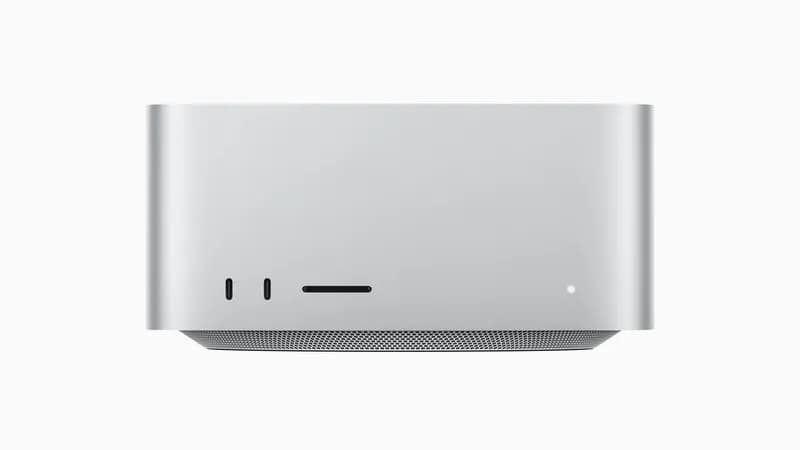
1. Mac Studio M4 Max — Best for Silent AI Inference
The Mac Studio M4 Max is the most unconventional pick on this list, and for many AI practitioners, it is the right one. With 128GB of unified memory in the top configuration, it runs 70B parameter LLMs like Llama 4 Maverick 70B natively through Ollama and llama.cpp's Metal backend — something that requires dual NVIDIA GPUs or an enterprise card on the x86 side.
Key Specs
- Chip: Apple M4 Max — 16-core CPU, 40-core GPU
- Memory: Up to 128GB unified (shared CPU/GPU)
- Memory Bandwidth: 546 GB/s
- Storage: Up to 8TB SSD
- Power: ~75W idle, ~180W peak
- Noise: Effectively silent under AI workloads
- Price: $1,999 (base) / $3,999 (128GB config)
Pros
- 128GB unified memory runs 70B models on a single machine — no multi-GPU complexity
- Near-silent — minimal fan noise even under sustained inference
- 180W total system power vs. 600W+ for an equivalent NVIDIA tower
- Zero configuration — Ollama installs in one command, models run immediately
- macOS ecosystem integration for developers already on Apple platforms
Cons
- Token generation is 30–50% slower than RTX 5090 due to lower memory bandwidth (546 GB/s vs. 1,792 GB/s)
- No CUDA support — some ML frameworks require workarounds or Metal-specific backends
- Not upgradeable — memory and GPU are soldered to the chip
- Fine-tuning support is limited compared to NVIDIA's ecosystem
Best for: Developers and researchers who want plug-and-play 70B model inference in a silent, energy-efficient form factor. If you value simplicity over raw throughput, the Mac Studio is the best AI machine under $5,000. For more on Apple Silicon for AI, see our Mac Mini M4 for AI deep dive or the Apple Silicon for AI hub. For a direct performance breakdown: Mac Studio M4 Max vs RTX 5090.
2. Supermicro GPU Server — Best for Enterprise Scale
The Supermicro GPU Server is not a desktop workstation — it is a rack-mounted inference and training machine built for teams that need multi-GPU scale. Configurable with up to 8 NVIDIA GPUs (H100, A100, or L40S), it handles everything from distributed training on 405B parameter models to serving production inference for thousands of concurrent users.
Key Specs
- GPU: Up to 8x NVIDIA H100 80GB SXM or 8x A100 80GB
- VRAM: Up to 640GB HBM3 (8x H100 config)
- CPU: Dual Intel Xeon or AMD EPYC
- RAM: Up to 4TB DDR5 ECC
- Networking: Up to 400Gb InfiniBand
- Price: $8,000–$15,000 barebones (GPUs, CPU, and RAM extra) to $250,000+ (fully loaded)
Pros
- Scales to 8 GPUs with NVLink/NVSwitch interconnect for distributed training
- Enterprise-grade ECC memory, redundant PSUs, IPMI remote management
- Supports the full range of NVIDIA datacenter GPUs
- Hot-swap drives and fans for zero-downtime maintenance
Cons
- Requires datacenter or dedicated server room — loud, hot, heavy
- Configuration complexity — not a plug-and-play experience
- Barebones chassis starts at $8,000 before GPUs — a configured 8-GPU build scales into six figures
- Overkill for individual researchers or small teams
Best for: AI teams, startups, and research labs that need multi-GPU training capacity or high-throughput production inference. Not for home or office use.
3. Razer Blade 16 — Best Portable AI Workstation
The Razer Blade 16 is the best laptop for AI development in 2026, though "best" comes with significant caveats. Its RTX 5080 Laptop GPU (16GB GDDR7 — configurable up to an RTX 5090 with 24GB) delivers real CUDA-accelerated inference in a portable form factor, making it the only machine on this list you can take to a conference, client meeting, or coffee shop.
Key Specs
- GPU: NVIDIA RTX 5080 Laptop (16GB GDDR7) — up to RTX 5090 (24GB)
- CPU: Intel Core Ultra 9 386H (16 cores)
- RAM: 64GB LPDDR5X-9600 (soldered)
- Storage: 1TB PCIe 4.0 NVMe (2x M.2, up to 8TB)
- Display: 16" 2560x1600 240Hz OLED
- Price: $4,699 (RTX 5080 / 64GB / 1TB on Amazon); 2TB configs from $7,000
Pros
- True CUDA-accelerated inference in a laptop form factor
- 16GB GDDR7 handles 7B–14B models comfortably; the RTX 5090 config adds headroom to 24GB
- Dual-use as a development machine — run code, test models, present results
- Excellent build quality and display for the price
Cons
- 16GB VRAM on the linked config (24GB max) is the hard ceiling — no 70B+ models, limited future-proofing
- A 165W laptop RTX 5080 is well below the 360W desktop card of the same name
- Thermal throttling under sustained workloads — fan noise is significant
- Battery life under AI load is 45–90 minutes
Best for: AI developers who need portability for fieldwork, client demos, or travel. A strong secondary machine alongside a desktop workstation. For a cheaper, more repairable alternative, see Framework Laptop 16 vs Razer Blade 16. For more laptop options, see Best AI Laptops in 2026.
4. BOXX APEXX S3 — Best Single-GPU Creative Workstation
BOXX Technologies has built workstations for VFX studios, architecture firms, and engineering teams for over 25 years. The APEXX S3 brings that professional-grade engineering to AI workloads with a single RTX 5090, ISV-certified drivers, and a chassis designed for sustained GPU compute.
Key Specs
- GPU: NVIDIA RTX 5090 32GB
- CPU: Intel Core i9-14900KS or AMD Ryzen 9 9950X
- RAM: 64GB–128GB DDR5-5600 ECC optional
- Storage: Up to 8TB NVMe + 16TB HDD
- Cooling: Custom liquid cooling loop on CPU, direct-air GPU
- Warranty: 3-year parts and labor, optional on-site service
- Price: $5,200 (base RTX 5090 config)
Pros
- ISV-certified for NVIDIA AI Enterprise, DaVinci Resolve, Unreal Engine
- Whisper-quiet under load — custom acoustic engineering
- 3-year warranty with phone-based engineering support
- Configurable to exact specs — no bloatware, no compromises
Cons
- Single-GPU maximum in the S3 chassis — need the APEXX T4 for multi-GPU
- $5,200 starting price is 20–25% above DIY equivalent
- Lead time of 5–10 business days for custom configs
- Limited Linux pre-install options — ships with Windows by default
Best for: Creative professionals who use AI alongside traditional GPU workloads — video editing, 3D rendering, simulation — and want a single validated system that handles everything. The BOXX premium buys you ISV certification and engineering support that DIY builders lack.
5. Puget Systems Peak — Best Professional AI Workstation
Puget Systems has earned a reputation as the gold standard for professional workstations, and the Peak series applies that same engineering rigor to AI. Every system ships after a multi-day burn-in test under sustained GPU load, with documented thermal and stability results. Their published benchmark database is one of the most comprehensive independent hardware testing resources in the industry.
Key Specs
- GPU: NVIDIA RTX 5090 32GB (configurable up to RTX 6000 Ada 48GB)
- CPU: AMD Ryzen Threadripper PRO 7995WX or Intel Xeon w9-3595X
- RAM: 128GB–512GB DDR5 ECC
- Storage: Up to 16TB NVMe RAID + 64TB HDD
- Cooling: Custom liquid cooling with sustained-workload thermal validation
- Warranty: Lifetime labor, 3-year parts, next-business-day response
- Price: $6,500 (RTX 5090 base) / $12,000+ (RTX 6000 Ada / dual-GPU)
Pros
- Industry-best support — lifetime labor warranty, direct access to engineers
- Multi-day burn-in testing under real AI workloads before shipping
- Threadripper PRO platform supports up to 512GB ECC RAM and massive PCIe lane count
- Configurable with up to 2x GPUs in the tower chassis
- Extensive published benchmarks — you know exactly what performance to expect
Cons
- Premium pricing — 25–35% above DIY equivalent parts
- 7–15 business day lead time for custom configurations
- Limited to 2 GPUs in tower form factor — need rackmount for more
- Based in Auburn, WA — international shipping adds cost and time
According to Puget Systems' own published benchmark data, their Peak workstation with RTX 5090 achieves 213 tokens/sec on Llama 3.1 8B and maintains that speed under sustained 24-hour runs without thermal throttling — a claim most DIY builds cannot reliably match without careful thermal engineering.
Best for: Professionals and research teams who need guaranteed performance, enterprise-grade support, and a system validated for sustained AI workloads. The Puget premium is an insurance policy against downtime. See also: AI Workstation Cost Breakdown.
6. Lambda Hyperplane — Best Multi-GPU Training Rig
Lambda is an AI-infrastructure company first, hardware vendor second. The Hyperplane desktop workstation is built by engineers who use these machines daily for ML research. It ships with Lambda Stack pre-installed — a validated software bundle including PyTorch, TensorFlow, CUDA, cuDNN, and NVIDIA drivers, all tested for compatibility. No driver debugging. No CUDA version mismatch. You boot it, open a terminal, and start training.
Key Specs
- GPU: Up to 4x NVIDIA RTX 6000 Ada (48GB each) or 4x RTX 5090 (32GB each)
- VRAM: Up to 192GB (4x RTX 6000 Ada) or 128GB (4x RTX 5090)
- CPU: AMD Threadripper PRO 7985WX (64 cores)
- RAM: 256GB–512GB DDR5 ECC
- Storage: Up to 24TB NVMe
- Software: Lambda Stack (Ubuntu + pre-configured ML frameworks)
- Warranty: 3-year hardware + direct ML engineering support
- Price: $22,000 (dual RTX 5090) / $45,000+ (4x RTX 6000 Ada)
Pros
- Lambda Stack eliminates ML software configuration — PyTorch, CUDA, cuDNN validated and pre-installed
- Up to 4 GPUs with NVLink support for distributed training
- Direct support from ML engineers, not just hardware technicians
- Threadripper PRO provides 128 PCIe 5.0 lanes — no bandwidth bottlenecks with 4 GPUs
Cons
- $22,000+ starting price puts it firmly in enterprise territory
- Large tower chassis — needs dedicated desk or floor space
- Power draw with 4 GPUs can exceed 2,000W — requires dedicated 20A circuit
- Overkill for inference-only workloads — designed for training and fine-tuning
Best for: ML research teams, AI startups, and professionals who fine-tune or train models regularly. The Lambda Hyperplane's value is the pre-validated software stack and multi-GPU capability — you are paying for engineering hours saved, not just hardware.
7. Beelink SER8 — Best Budget Entry Point
The Beelink SER8 is not a traditional AI workstation — it is a palm-sized mini PC that punches surprisingly hard for AI experimentation. Powered by an AMD Ryzen 7 8845HS with an integrated Ryzen AI NPU delivering up to 16 TOPS, it handles 7B parameter models — Llama 4 Scout 8B, Mistral 7B, Qwen 3 7B — through llama.cpp CPU inference at usable speeds. At $559, it is the lowest-cost path into local AI that we recommend.
Key Specs
- CPU/APU: AMD Ryzen 7 8845HS (8 cores, 16 threads, Ryzen AI NPU)
- RAM: 32GB DDR5-5600
- Storage: 1TB PCIe 4.0 NVMe
- GPU: Integrated Radeon 780M + Ryzen AI NPU (16 TOPS)
- Power: 45–54W TDP
- Size: 5.0 x 5.0 x 1.9 inches
- Price: $559
Pros
- $559 all-in — no GPU to buy separately
- Runs Llama 3.1 8B at 8–12 tokens/sec via CPU inference — usable for interactive chat
- Completely silent, ultra-low power (45W under AI load)
- Fits anywhere — works as an always-on AI assistant on your desk
- 32GB RAM means models load without swapping
Cons
- CPU inference only — no discrete GPU means no CUDA acceleration
- Limited to 7B–8B models at usable speeds; 13B models run but slowly
- No fine-tuning or training capability
- Not upgradeable — no PCIe slot for a discrete GPU
Best for: Budget-conscious developers, students, and anyone who wants an always-on local AI assistant without spending thousands. Perfect as a secondary inference machine or home server running Ollama 24/7. See Best Mini PC for LLM Inference for more compact options, or browse the Mini PC for AI hub.
Pre-Built vs. DIY: Cost Comparison
The pre-built premium is real, but so is the time cost of building. Here is how the math works at three budget tiers:
| Tier | Pre-Built Price | DIY Parts Cost | Premium | Build Time Saved | Effective Hourly Cost of Premium* |
|---|---|---|---|---|---|
| Budget (~$1.5K) | $1,399 (Mac Mini M4 Pro) | N/A (no DIY equivalent) | N/A | N/A | N/A — Apple Silicon has no DIY path |
| Mid-Range (~$5K) | $5,200 (BOXX APEXX S3 / RTX 5090) | $3,900 (equivalent parts) | $1,300 (33%) | 10–15 hours | $87–$130/hr |
| High-End (~$10K+) | $12,000 (Puget Peak / RTX 6000 Ada) | $8,500 (equivalent parts) | $3,500 (41%) | 15–25 hours | $140–$233/hr |
*Effective hourly cost = pre-built premium divided by estimated build, configuration, and troubleshooting time. Does not include the value of warranty, burn-in testing, or ongoing support.
The Real Calculation
The pre-built vs. DIY decision is not about hardware cost — it is about your hourly rate. If you bill $150/hr as a consultant or researcher, the $1,300 BOXX premium costs less than one day of lost productivity. If you are a student or hobbyist with more time than budget, DIY wins every time. Our step-by-step build guide makes it straightforward.
What Pre-Built Gets You Beyond Parts
- Burn-in testing: Puget Systems runs every system under sustained GPU load for 24–48 hours before shipping. This catches infant mortality failures — DOA RAM, flaky NVMe drives, thermal paste application issues — before they ruin your training run.
- Validated BIOS settings: Multi-GPU configurations require specific BIOS settings for PCIe lane allocation, Above 4G Decoding, and resizable BAR. Vendors configure these correctly; DIY builders often miss them.
- Cable management and airflow: Professional builds route cables for optimal airflow. A poorly managed DIY build with cables blocking GPU intake can throttle 10–15% under sustained load.
- Single-vendor support: When something fails, you call one number. DIY builders troubleshoot between GPU, motherboard, PSU, and RAM vendors — each pointing to the other.
Frequently Asked Questions
Should I buy a pre-built AI workstation or build my own?
Buy pre-built if you value time-to-deploy, professional warranty, and validated hardware compatibility. A pre-built workstation from Puget Systems or BOXX ships tested and ready, with next-business-day support. Build your own if you want maximum price/performance — DIY saves 15–30% on equivalent specs — and you are comfortable assembling hardware and troubleshooting driver issues. For most professionals billing hourly, the 10–20 hours saved on a pre-built pays for the markup. See our DIY build guide if you go that route.
What is the best budget pre-built AI workstation under $5,000?
The Mac Studio M4 Max at $3,999 (128GB unified memory) is the best pre-built AI machine under $5,000. It runs 70B parameter LLMs natively, is near-silent, and requires zero configuration. For a Windows/Linux option, the Beelink SER8 at $559 is an excellent entry point for 7B–8B models. In between, look at configured Puget Systems builds starting around $4,500 with an RTX 4090.
What GPU should I look for in a pre-built AI workstation?
VRAM is the most important spec. At minimum, target 24GB (RTX 4090 or RTX 5090) for serious LLM inference. For training and fine-tuning larger models, 48GB (RTX 6000 Ada) or 80GB (A100/H100) is ideal. Avoid configurations with under 16GB VRAM — they limit you to 7B models. For the complete GPU buyer's guide, see Best GPU for AI in 2026.
Is a Mac Studio good enough for AI and machine learning?
Yes, for inference. The Mac Studio M4 Max with 128GB unified memory runs 70B models through Ollama at approximately 15–25 tokens/sec depending on quantization — usable for interactive work but 30–50% slower than an RTX 5090 desktop. It lacks CUDA, which limits training framework compatibility. Best for developers who value silence, energy efficiency, and zero-config setup over maximum throughput.
How much should I spend on a pre-built AI workstation?
The sweet spot for most AI practitioners is $4,000–$6,000, which gets you a single RTX 5090 system (Puget or BOXX) or a Mac Studio M4 Max with 128GB. Below $1,500, the Beelink SER8 or Mac Mini M4 Pro handles 7B models — see Mac Mini M4 Pro vs Mac Studio M4 Max for where the step up pays off. Above $10,000, you enter multi-GPU territory (Lambda Hyperplane) for training and fine-tuning. Match your budget to your workload — our cost breakdown guide has the full analysis.
Frequently Asked Questions
Should I buy a pre-built AI workstation or build my own?
Buy pre-built if you value time-to-deploy, professional warranty, and validated hardware compatibility. A pre-built workstation from Puget Systems or BOXX ships tested and ready, with next-business-day support. Build your own if you want maximum price/performance — DIY saves 15–30% on equivalent specs — and you are comfortable assembling hardware and troubleshooting driver issues. For most professionals billing hourly, the 10–20 hours saved on a pre-built pays for the markup.
What is the best budget pre-built AI workstation under $5,000?
The Mac Studio M4 Max at $3,999 (128GB unified memory configuration) is the best pre-built AI machine under $5,000. It runs 70B parameter LLMs natively, is near-silent, and requires zero configuration. For a Windows/Linux option, the Beelink SER8 at $559 is an excellent entry point for 7B–8B models, though it relies on CPU inference. There is a significant gap between $600 and $4,000 where few turnkey options exist — in that range, DIY or a configured Puget Systems build is typically the better path.
What GPU should I look for in a pre-built AI workstation?
VRAM is the single most important GPU spec for AI workloads. Look for at least 24GB (RTX 4090 or RTX 5090) for serious LLM inference and fine-tuning. For enterprise workloads, 48GB+ (NVIDIA RTX 6000 Ada or A100/H100) enables full-precision training on larger models. Avoid configurations with GPUs under 16GB VRAM — they limit you to 7B models and will feel outdated within a year as model sizes continue growing.
Is a Mac Studio good enough for AI and machine learning?
Yes, for inference workloads. The Mac Studio M4 Max with 128GB unified memory can run 70B parameter models through Ollama and llama.cpp's Metal backend. It excels at silent operation, energy efficiency (75W idle), and zero-configuration setup. The trade-off is speed: Apple Silicon's memory bandwidth is lower than dedicated NVIDIA GDDR7 or HBM, so token generation is 30–50% slower than an equivalent RTX 5090 system. It also lacks CUDA support, which means some ML frameworks require workarounds. Best for developers and researchers who prioritize convenience over raw throughput.
How much should I spend on a pre-built AI workstation?
Budget depends on your workload. For running 7B–13B models and experimenting with local AI, $500–$1,500 gets you a capable mini PC or Mac Mini. For professional work with 30B–70B models, fine-tuning, and image generation, plan for $4,000–$8,000 (Mac Studio or single-GPU tower). For multi-GPU training, production inference, or enterprise deployment, $10,000–$30,000+ for systems like the Lambda Hyperplane or Puget Systems Peak with dual GPUs. The sweet spot for most AI practitioners is the $4,000–$6,000 range.