How to Run Mistral Large 4 Locally (2026): The Hardware It Actually Takes — Before the Weights Drop
Mistral Large 4 is a ~1.05T-parameter multimodal MoE with 52B active parameters, and the open weights are due by October 31. At 4-bit it needs roughly 635GB of memory. Here's the full quant-size table, the bandwidth math that sets your tokens per second, the four hardware paths that can actually hold it (512GB Mac Studio, GPU + RAM offload, a Spark/Strix cluster, an 8-GPU server), and the honest offramp for everyone else.
Compute Market Team
Our Top Pick
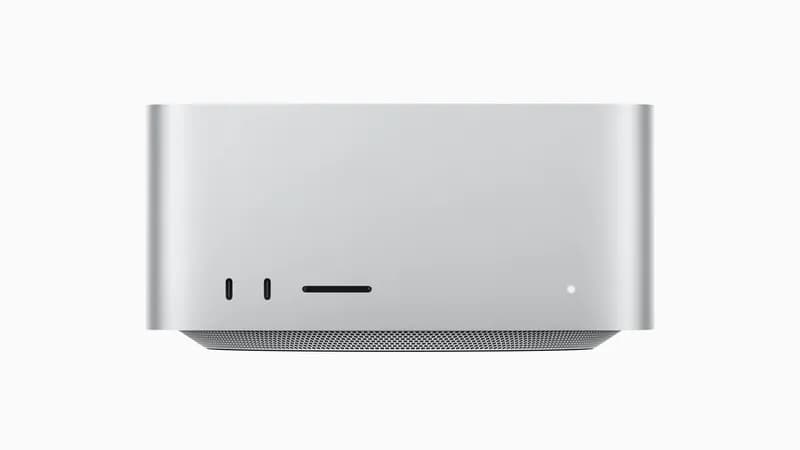
Apple Mac Studio M5 Ultra
From $5,499Status: pre-release. Updated when the weights ship. Every memory size in this guide is a calculated estimate, and we show the formula. When the real GGUF and MLX files land on Hugging Face (ETA October 31, 2026), we'll replace the estimates with measured file sizes on this page.
Mistral opened the preview of Mistral Large 4 on October 6, 2026, and the first question from anyone who runs models locally is the obvious one: what does it take to run this at home? The current search results are launch-news rewrites that repeat the parameter count and stop. This guide does the memory math, the bandwidth math, and the buying decision, three weeks before the weights are out, so you can plan (or decide not to) before the 512GB Mac Studios sell out.
The short answer: Mistral Large 4 is a ~1.05-trillion-parameter MoE with 52B active parameters. At 4-bit it needs roughly 635GB of memory, so no single consumer GPU can run it. The only single-box option is a 512GB Mac Studio M5 Ultra at 3-bit or lower. Everyone else needs expert offload to hundreds of GB of system RAM, or a multi-node cluster.
Mistral Large 4 at a Glance: What's Actually Confirmed (as of Oct 10)
We've kept confirmed facts, unknowns and our own estimates separate. Each confirmed item links to the primary source we read.
| Spec | Value | Status / Source |
|---|---|---|
| Total parameters | ~1T (1.05T) | Confirmed: Mistral launch post says 1T; Mistral docs say 1.05T |
| Active parameters | 49B per token, 52B incl. embeddings + output layers | Confirmed: Hugging Face model card |
| Modality | Natively multimodal, 1.6B vision encoder | Confirmed: Mistral docs |
| Context window | 1M tokens | Confirmed: Mistral docs |
| Availability | Preview API / Mistral Studio since Oct 6, 2026 | Confirmed |
| Open weights | "by the end of the month", HF ETA Oct 31, 2026 | Confirmed (date is an ETA) |
| Expert count / routing | — | Unknown |
| Release precision (BF16 / FP8 / FP4) | — | Unknown |
| License | — | Unknown (Large 3 was Apache 2.0) |
A note on the 49B-vs-52B discrepancy, because you'll see both numbers quoted: the Hugging Face card states the model has "49 billion active parameters per token (52 billion including embeddings and output layers)." Both numbers are correct. For hardware planning, use 52B: embeddings and the output head are read on every token too, so they count against your memory bandwidth.
Mistral also states that ML4 "was trained from scratch on 3,800 NVIDIA Grace Blackwell GPUs in Mistral's own datacenters in Europe," and positions it as able to "run on private cloud or on-premise" for security work. That on-prem pitch is why the EU and regulated-industry crowd should care about the sizing below.
How Much Memory Does Mistral Large 4 Need? (Quant Table)
An MoE model's total parameter count decides how much memory you need, because every expert has to be resident for the router to pick from. Only 52B parameters fire per token, but all ~1.05T have to sit in unified memory, VRAM, or system RAM. The formula:
Weight size (GB) ≈ total parameters (billions) × bits per weight ÷ 8
Applied to 1,050B parameters with typical effective bits-per-weight for each GGUF quant type:
| Quant | ~Bits/weight | Estimated weights | What can hold it |
|---|---|---|---|
| FP8 | 8.0 | ~1,050 GB | 8× H200/B200-class server |
| Q6_K | ~6.6 | ~860 GB | Multi-GPU server + large RAM pool |
| Q4_K_M | ~4.8 | ~635 GB | 2× 512GB Mac Studio, or GPU + 768GB RAM |
| Q3_K_M | ~3.9 | ~510 GB | GPU + 512–768GB RAM (too tight for one 512GB Mac) |
| Q2_K | ~2.7–3.0 | ~350–390 GB | 512GB Mac Studio, GPU + 384GB+ RAM, 4-node cluster |
| ~1.8-bit dynamic | ~1.8–2.1 | ~240–280 GB | 512GB Mac Studio (comfortable), 4× 128GB cluster |
These are estimates, not file sizes. Real GGUFs vary because quantizers keep some tensors (attention, router, embeddings, the vision encoder) at higher precision. The ~1.8-bit row assumes someone ships "dynamic" low-bit quants of the kind quantization shops have produced for previous 700B+ MoE releases. That's likely, but not guaranteed on day one.
On top of the weights you need room for the KV cache, which grows with context length. Mistral hasn't published the attention configuration, so we can't size it exactly. For planning, keep at least 10–15% headroom above the weight size for 32K-class context, and a lot more if you actually want to use a meaningful slice of the 1M window. Our how much RAM for local AI guide explains why context, not weights, often decides the purchase.
Why 52B Active Parameters Decide Your Speed: Memory Bandwidth Math
Capacity decides whether it runs. Bandwidth decides how fast. During generation, each token reads every active weight from memory once, so the hard ceiling is:
Max tokens/sec ≈ memory bandwidth (GB/s) ÷ bytes read per token (GB)
At Q4 (~4.8 bits/weight), 52B active parameters is about 31 GB read per token. That gives these theoretical upper bounds:
| Memory system | Bandwidth | Q4 ceiling | Q2 ceiling (~18 GB/token) |
|---|---|---|---|
| Mac Studio M5 Ultra | 1.2 TB/s | ≤ ~38 tok/s | ≤ ~65 tok/s |
| 12-channel DDR5 server (4800–6400) | ~460–615 GB/s | ≤ ~15–20 tok/s | ≤ ~25–34 tok/s |
| Dual-channel desktop DDR5 | ~80–100 GB/s | ≤ ~3 tok/s | ≤ ~5 tok/s |
These are ceilings, not benchmarks. Real throughput typically lands well below them once you add compute overhead, KV-cache reads, cross-device hops, and prompt processing. Nobody has measured ML4 locally yet because the weights don't exist publicly. We'll add measured numbers when they do.
The comparison most launch coverage misses is Mistral Large 4 vs Kimi K2.6. Both are ~1T-total MoEs with nearly identical memory footprints (Kimi's Q4_K_M is ~634GB). But Kimi activates ~32B parameters per token, and ML4 activates 52B, so ML4 reads about 1.6× more bytes per token. On the same box at the same quant, expect ML4 to generate roughly 35–40% slower than Kimi K2.6. If you've already built a Kimi rig, it will hold ML4, but it won't run it as fast.
Option 1: Mac Studio M5 Ultra 512GB, the Single-Box Answer
The Mac Studio M5 Ultra is the only single machine you can buy at retail that holds Mistral Large 4: up to 512GB of unified memory at 1.2TB/s, silent, on a desk. It's the best option for anyone who wants ML4 locally without building a server.
What fits, by our estimates:
- ~1.8-bit dynamic (240–280GB): fits comfortably, with plenty of room for long context.
- Q2_K (350–390GB): fits with reasonable KV-cache headroom.
- Q3_K_M (~510GB): does not fit. macOS keeps part of unified memory for the system, and by default the GPU can't wire all of it. A smaller 3-bit variant might squeeze in with the GPU wired-memory limit raised, but treat that as an experiment.
- Q4_K_M (~635GB): does not fit in one machine.
Q4 path: two Mac Studios. Two 512GB units (1TB combined) linked over Thunderbolt 5 can in principle shard Q4 using MLX distributed inference or exo. This is untested for ML4, and every token crosses the Thunderbolt link, which costs speed compared with one box. Our Mac cluster guide covers how this works in practice, and MLX vs llama.cpp on Apple Silicon covers which runtime to use. MLX conversions of big Mistral models have historically appeared quickly after release.
Price and availability: the M5 Ultra Mac Studio starts at $5,499. The 512GB configuration costs a lot more. Apple hadn't published its price when we checked, and Macworld's Michael Simon reported that the fully loaded configuration "won't be available until October" and would cost "well over 20 grand." Price it in Apple's configurator before you budget. Because the 512GB units and the ML4 weights arrive in the same month, expect the 512GB configuration to be in short supply.
If you're on the fence between the Ultra and a cheaper Mac, read our M5 Mac mini and Mac Studio guide first. The Mac Studio M5 Max (from $2,499; tops out at 128GB) is a great local-AI machine, but it cannot run Mistral Large 4 at any quant. See the Apple Silicon for AI hub for the rest of the lineup.
Option 2: One Big GPU + Lots of RAM (MoE Expert Offload)
This is the path the r/LocalLLaMA crowd will take, and it's the best option for CUDA users who already own a high-VRAM card. The trick exploits MoE structure: attention layers, shared weights and the router run on every token and benefit most from GPU speed, while the hundreds of GB of expert weights each fire only occasionally. So you keep the hot path on the GPU and park the experts in system RAM.
In llama.cpp this is built in. The server documentation lists --cpu-moe ("keep all Mixture of Experts (MoE) weights in the CPU"), --n-cpu-moe N ("keep the Mixture of Experts (MoE) weights of the first N layers in the CPU"), and the more granular -ot / --override-tensor for regex-based placement. A typical recipe once GGUFs exist:
llama-server -m Mistral-Large-4-Q2_K.gguf \
  -ngl 999 --n-cpu-moe 999 \
  -c 32768 --threads 32
That puts all layers on the GPU, then pulls the expert tensors back to CPU RAM. Lower --n-cpu-moe until your VRAM is full to move some experts onto the card. The step-by-step version is in our guide to running large MoE models on a small GPU.
Recommended build:
- GPU: RTX 5090 (32GB GDDR7, $1,999 – $2,199 MSRP range; street prices run higher). A used RTX 3090 ($699 – $999) works too, with less room for attention layers and KV cache.
- Platform: this is where the money goes. Desktop boards top out far below what you need. You need a workstation or server platform with 8–12 memory channels: 384GB+ RAM for Q2, 768GB for Q4. Channel count matters as much as capacity, because the experts stream from RAM and system memory bandwidth becomes your token-rate ceiling (see the table above).
- Storage: a fast NVMe like the Samsung 990 Pro 4TB ($289 – $339). You'll be loading 350–635GB of weights on every cold start, and a slow drive turns that into a coffee break.
Two caveats. First, DRAM prices are still elevated, and 768GB of server DDR5 can cost more than the GPU. Read our DRAM shortage buying guide before you price this out. Second, the software is getting faster on the GPU side: in its IFA 2026 announcement, NVIDIA says "llama.cpp delivers up to 1.9x higher throughput through kernel optimizations on a GeForce RTX 5090." That's a vendor claim measured on other models, not on ML4. In an offload setup, the RAM-resident experts are usually the bottleneck, so don't expect GPU-side gains to carry over fully.
Weighing the 5090 against a Mac? Our Mac Studio vs RTX 5090 comparison covers the general trade-off between unified memory and discrete VRAM.
Option 3: Cluster It (DGX Spark ×4 or Strix Halo ×4)
Four 128GB boxes give you 512GB of pooled memory, roughly the same as a maxed-out Mac Studio, spread across nodes. With model sharding across the cluster, the ~1.8-bit dynamic quant fits with headroom and Q2_K fits tight.
- NVIDIA DGX Spark ($4,699 – $7,999 each): 128GB of coherent memory per unit, CUDA-native, and supported by vLLM. NVIDIA's IFA post claims vLLM speedups of "up to 1.4x on two DGX Spark clusters". That's a vendor figure for two-node setups, and four-node scaling for a model this size is unproven.
- GMKtec EVO-X2 (Ryzen AI Max+ 395, $2,199 – $3,649 each): the cheaper Strix Halo route to 128GB per node, using llama.cpp's RPC backend over Ethernet. Four nodes cost a fraction of four Sparks. Expect weaker interconnect performance and more tinkering.
Be honest about the bottleneck here: the network. Within one box, memory moves at hundreds of GB/s. Between boxes it moves over Ethernet or RDMA links that are an order of magnitude slower, and a sharded model pays that cost on every token. Clustering is the best option for people who already own one or two of these boxes and want to stretch to ML4. It's rarely the cheapest way to start from zero. Our DGX Spark vs Strix Halo comparison breaks down per-node trade-offs.
One clarification, because it's already being misread: NVIDIA's PAIR tool, announced in the same IFA post, "routes independent inference requests" between compatible PCs on a local network. It load-balances separate requests across machines. It does not split one model across them, so it won't help you fit Mistral Large 4.
Option 4: On-Prem / Business, the 8-GPU Server Class
If you're a business running ML4 at full quality for multiple users, which is the private-cloud and on-premise case Mistral is pitching, you're in datacenter territory:
- FP8 (~1,050GB): needs 8× H200/B200-class GPUs. Eight 80GB cards top out at 640GB, so they can't hold it.
- Q4 class (~635GB) with real concurrency: a Supermicro SYS-421GE-TNRT ($8,000 – $15,000 barebones, up to 10 double-width GPUs, up to 8TB DDR5) populated with H100 PCIe 80GB cards ($25,000 – $33,000 each) puts 800GB of VRAM in one chassis. That host's large DDR5 capacity also makes it a strong hybrid-offload platform at much lower GPU counts.
That's a six-figure deployment before networking and power. Our local AI server for business guide and the private AI server for teams walkthrough cover the surrounding decisions (serving stack, access control, utilization). For multi-card topologies, see the multi-GPU setup guide.
The Honest Offramp: What to Run Instead on Hardware You Can Afford
Most people reading this can't run Mistral Large 4 locally, and that's fine. The best setup for most readers is a hybrid:
- Use the ML4 API for the occasional frontier task. Mistral's docs list $1.36 per million input tokens and $4.18 per million output tokens, and were showing a 50% launch discount ($0.68 / $2.09) when we checked on October 10. That's cheap enough that dozens of hard prompts a day cost less per month than one stick of server RAM.
- Run a strong mid-size model locally for everything else. Qwen3.8-27B weighs ~17GB at Q4 and runs well on a single RTX 5090 or a used RTX 3090. A 16GB RTX 5060 Ti ($429 – $479) is the budget entry point for smaller quants and shorter context.
- Want a quiet box instead of a GPU tower? A 128GB Strix Halo mini PC or Mac Studio M5 Max runs 70B–120B-class dense and MoE models comfortably, plus a lot more context.
If you only want to try Mistral models locally, start small: Mistral's smallest open model, Mistral 7B, runs on almost anything. Our local LLM guide hub maps every tier.
Mistral Large 4 vs Kimi K2.6 vs GLM-5.2: Local Hardware Compared
| Model | Total / active params | Q4 footprint | Smallest practical quant | Cheapest viable rig |
|---|---|---|---|---|
| Mistral Large 4 | ~1.05T / 52B | ~635 GB (est.) | ~240–280 GB (est., dynamic ~1.8-bit) | 512GB Mac Studio M5 Ultra, or GPU + 384GB RAM server |
| Kimi K2.6 | 1.04T / ~32B | ~634 GB | ~350 GB (UD-Q2_K_XL) | 4× RTX 3090 + 256GB RAM |
| GLM-5.2 | 743B / ~39B | ~450 GB (est.) | ~239 GB (2-bit dynamic) | 256GB-class Mac Studio, or 4× RTX 3090 + 192GB RAM |
The takeaways:
- Mistral Large 4 needs about the same memory as Kimi K2.6 but runs slower per byte of bandwidth, because of its 52B vs ~32B active parameters.
- GLM-5.2 is the easiest of the three to run locally. It's the only one that fits a 256GB machine.
- Mistral Large 4 is the only one of the three that's natively multimodal, which matters if you need image input on-prem.
Verdict: Who Should Buy What
| You are… | Best option for Mistral Large 4 | Why |
|---|---|---|
| A Mac user who wants it on a desk | Mac Studio M5 Ultra, 512GB | Only single box that holds it; 1.2TB/s gives the highest single-node ceiling |
| A CUDA homelabber with a 5090 or 3090 | Expert offload on an 8–12-channel server platform | Reuses your GPU; RAM capacity is the real cost |
| Already own 1–2 Sparks or Strix Halo boxes | Cluster to 4 nodes | Stretches existing hardware; network-bound |
| A business needing on-prem, multi-user | Supermicro + datacenter GPUs | Only path to FP8/Q4 with real concurrency |
| Everyone else | ML4 API + Qwen3.8-27B on one GPU | 90% of the value for a fraction of the cost |
The weights are due October 31. Bookmark this page: when they ship, we'll swap every estimate above for real GGUF and MLX file sizes and add measured tokens-per-second where we can. Until then, the formulas on this page are the best planning tool you have: total parameters × bits ÷ 8 for memory, bandwidth ÷ active bytes for speed.
Frequently Asked Questions
Can I run Mistral Large 4 on an RTX 5090?
Not on the card alone. Mistral Large 4 has about 1.05 trillion total parameters, so even an aggressive ~1.8-bit dynamic quant is estimated at 240–280GB, against 32GB of VRAM on an RTX 5090. What works is MoE expert offload: llama.cpp's --n-cpu-moe or --override-tensor flags keep attention and shared layers on the 5090 and park the expert weights in system RAM. For that you need roughly 384GB of RAM for a 2-bit quant or 768GB for Q4, which means a server or workstation platform, not a desktop motherboard.
Can a 256GB Mac Studio run Mistral Large 4?
Almost certainly not usefully. Our estimate for the smallest practical dynamic quant (~1.8 bits per weight) is 240–280GB, and macOS reserves part of unified memory for the system, so a 256GB machine has well under 256GB available to the GPU. A 512GB Mac Studio M5 Ultra is the smallest single Apple machine that fits a 2-bit quant with room for context. These are estimates until the weights and real GGUF/MLX files ship.
When will the Mistral Large 4 open weights be released?
Mistral's launch post (October 6, 2026) says 'We will release the weights by the end of the month', and the Hugging Face placeholder repo mistralai/Mistral-Large-4-1T-A52B lists an ETA of October 31, 2026. Until then the model is only available as a preview through Mistral's API and Mistral Studio.
Will Ollama support Mistral Large 4?
Unknown until the weights ship. Ollama runs on llama.cpp, so support depends on llama.cpp adding the architecture, including the 1.6B vision encoder for multimodal input. The text path is usually supported first. Even when it is, Ollama's defaults are not tuned for partial expert offload at this size, so plan on using llama.cpp directly (or MLX on a Mac) for a 1T-class model.
What license will Mistral Large 4 use?
Not confirmed as of October 10, 2026. Mistral's announcement calls the model open-weight, but neither the launch post nor the Hugging Face placeholder states the license terms. Mistral Large 3 shipped under Apache 2.0. Check the license file on Hugging Face when the weights land before you plan commercial or on-prem use.