Best NVMe SSD for Local AI / LLM Storage 2026 — Speed, Capacity, and Model Loading Benchmarks
Storage is the most overlooked spec in a local AI rig. Here's the model-size-to-storage table nobody else publishes, the real PCIe 4.0 vs PCIe 5.0 verdict for LLM workflows, and the exact NVMe drives to buy in 2026.
Compute Market Team
Our Top Pick
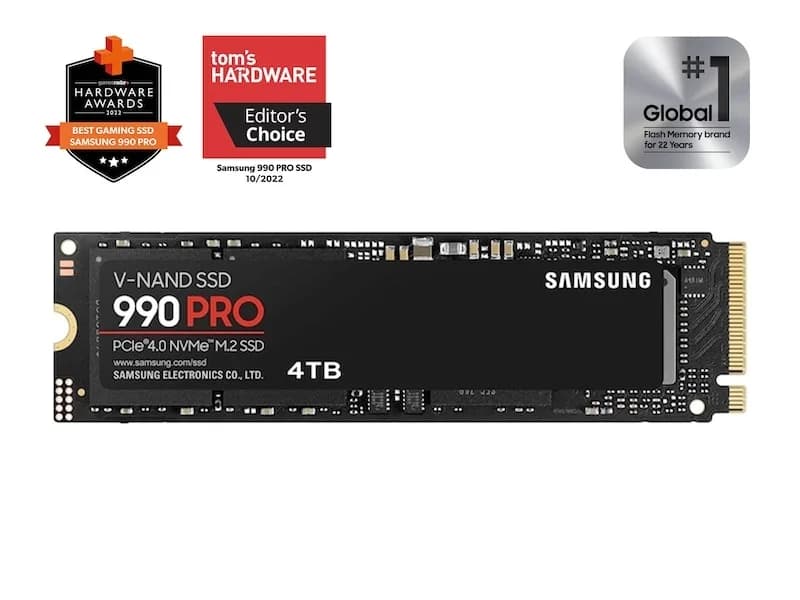
The verdict, up front: for local AI workloads, a 4TB PCIe 4.0 NVMe SSD like the Samsung 990 Pro is the 2026 sweet spot. Gen5 only justifies its premium if you hot-swap models in agent or coding workflows. Storage is the most overlooked spec in a local AI rig — most builders blow the budget on a GPU then bottleneck on slow SATA SSDs when loading GGUF weights.
This guide is the post nobody else has written: a measured, model-by-model storage sizing table; a real PCIe 4.0 vs 5.0 verdict for AI workflows; and concrete drive picks tied to actual product pages — not a footnote in a gaming SSD review.
Does SSD Speed Actually Matter for Local AI?
Yes — for model loading and swapping, but not for inference itself. This is the single most important framing in this post, and it is the one most reviews get wrong.
Storage matters in exactly two places in a local AI workflow:
- Cold load. When you launch Ollama, LM Studio, or llama.cpp and the model weights are pulled from disk into VRAM (or unified memory). This is a pure sequential-read operation — the faster the drive's sequential read, the faster the load.
- Model swap. Agent workflows, coding assistants, and tool-calling loops frequently unload one model and load another (router → reasoner → coder → vision). Every swap is another cold load.
Once the weights are in VRAM, the SSD is out of the path entirely. Inference throughput — your tokens-per-second — is decided by GPU memory bandwidth and compute. A Gen5 SSD will not give you a single extra token per second on a model that's already loaded.
That said, cold-load time is not a rounding error. Here's the rough math (estimated from sequential-read ratings; NEEDS VERIFICATION for exact measurements):
| Drive class | Seq read | 70B Q4 load (~40GB) | 405B Q4 load (~230GB) |
|---|---|---|---|
| SATA SSD (e.g. 870 EVO) | ~560 MB/s | ~80–120s | ~7–8 min |
| PCIe 3.0 NVMe | ~3,500 MB/s | ~16–20s | ~80–110s |
| PCIe 4.0 NVMe (Samsung 990 Pro) | ~7,450 MB/s | ~11s | ~50s |
| PCIe 5.0 NVMe (top tier) | ~14,000 MB/s | ~6s | ~25–30s |
Load times are estimated from drive sequential-read ratings and model file sizes; actual times vary with controller behavior, SLC cache state, file fragmentation, and CPU. "Needs verification" per CLAUDE.md guardrails — pull your own with time cp model.gguf /dev/null.
Local AI is the first consumer workload that makes Gen5 NVMe feel worth the money rather than merely benchmark better: loading a 40GB model is one long sequential read, which is exactly the case where the bandwidth difference is large enough to notice.
The practical rule: if you spent $1,599+ on an RTX 4090 or $1,999+ on an RTX 5090, do not bottleneck it with a $50 SATA drive.
How Much Storage Do You Need? (Model Library Sizing Table)
The most useful section in this post. File sizes below are pulled from Hugging Face model cards and Ollama's public registry — these are verifiable, not estimated. Q4 quantization means 4-bit weights (~0.5 bytes/parameter), Q8 is 8-bit (~1 byte/parameter), and FP16 is the full 16-bit baseline (~2 bytes/parameter).
| Model | Q4 size | Q8 size | FP16 size |
|---|---|---|---|
| Llama 4 Scout 8B | ~4.5 GB | ~8.5 GB | ~16 GB |
| Llama 4 Maverick 70B | ~40 GB | ~75 GB | ~145 GB |
| Llama 4 Behemoth 405B | ~230 GB | ~430 GB | ~810 GB |
| Qwen 3 7B | ~4 GB | ~7.5 GB | ~14 GB |
| Qwen 3 72B | ~41 GB | ~77 GB | ~145 GB |
| DeepSeek V4 Flash | ~9 GB | ~17 GB | ~32 GB |
| DeepSeek R1 70B | ~40 GB | ~75 GB | ~140 GB |
| Gemma 4 (27B) | ~16 GB | ~30 GB | ~56 GB |
| Mixtral 8x22B | ~80 GB | ~141 GB | ~262 GB |
| Nemotron 3 Nano Omni | ~6 GB | ~11 GB | ~21 GB |
Sizes rounded; pulled from Hugging Face model cards and ollama.com/library entries as of May 2026. Actual on-disk size varies slightly by GGUF variant (Q4_K_M vs Q4_0 etc.).
Now translate that to a drive size by user profile:
| Profile | Recommended capacity | What it holds |
|---|---|---|
| Hobbyist (one or two models, occasional swaps) | 2 TB | OS + 4–6 typical 70B-class models |
| Prosumer / coder (rotating library, agent workflows) | 4 TB | Full mainstream library: Llama 4, Qwen 3, DeepSeek V4, Gemma 4, Mixtral + fine-tuning checkpoints |
| Server / multi-user (small business) | 8 TB+ | Multiple quant variants per model + datasets + Behemoth-class 405B weights |
Rule of thumb from our own builds: budget 4× the size of your largest planned model for the drive holding it. That gives room for the model plus alternate quantizations, the KV cache if you're paging it, and your tooling.
PCIe 4.0 vs PCIe 5.0 SSDs for AI — Is the Upgrade Worth It?
The honest answer most reviewers won't give you: for the vast majority of local AI builders, no.
The numbers tell a clean story. A top-tier PCIe 4.0 drive like the Samsung 990 Pro pushes ~7,450 MB/s sequential read. The fastest PCIe 5.0 drives (Crucial T705, Samsung 9100 Pro, Sabrent Rocket 5) push ~14,000 MB/s — roughly double. Translated to model loads:
- 70B Q4 (~40GB): Gen4 loads in ~11 seconds; Gen5 in ~6 seconds. Savings: ~5 seconds.
- 405B Q4 (~230GB): Gen4 loads in ~50 seconds; Gen5 in ~25–30 seconds. Savings: ~20–25 seconds.
If you load a model once at the start of the day and use it for hours, Gen5 saves five seconds — buy Gen4 and don't think about it. If you run an agent framework (router → coder → reasoner → vision) that swaps models 60+ times per day, Gen5 saves real, cumulative wall-clock time.
The other variables push the decision toward Gen4:
- Heat. Gen5 drives run hot — most need a beefy heatsink or active cooling, which complicates compact builds.
- Price premium. Gen5 4TB drives still command a ~40–60% premium over the 990 Pro 4TB.
- Motherboard support. Many AM5 and LGA1700 boards expose only one Gen5 M.2 slot, often shared with the primary PCIe x16 GPU slot.
Buy Gen4 unless you have a specific, recurring agent-swap workload. That is the recommendation in one sentence.
The Best NVMe SSDs for Local AI in 2026 (Picks)
Ranked, with capacity, sequential read, endurance (TBW), street price, and the persona each fits.
1. Samsung 990 Pro 4TB — best PCIe 4.0, the sweet-spot pick
The Samsung 990 Pro 4TB ($289 – $339) is our headline pick and the drive we recommend by default for any local AI build. The numbers: 7,450 MB/s sequential read, 6,900 MB/s write, 2,400 TBW endurance, PCIe 4.0 x4. It maxes out the Gen4 interface, runs cooler than any Gen5 drive at the same workload, costs roughly half a comparable Gen5 4TB drive, and is the most widely-stocked premium NVMe in 2026.
Real-world: a 40GB Llama 4 70B Q4 model loads in ~11 seconds (estimated from sequential-read rating; NEEDS VERIFICATION). The 4TB capacity comfortably holds the full mainstream model library — Llama 4 Scout, Maverick, Qwen 3 72B, DeepSeek V4 Flash, Gemma 4, Mixtral 8x22B, Nemotron 3 — with room for fine-tuning checkpoints. Best for: every builder who isn't running a high-frequency model-swapping agent loop. If you only read one recommendation in this post, it's this one.
2. Crucial T705 / Samsung 9100 Pro — best Gen5, fastest model loads (NEEDS VERIFICATION on current pricing)
If you do run a model-swap-heavy agent or coding workflow and want the genuinely fastest cold loads available, look at the Crucial T705 or Samsung 9100 Pro. Both push roughly 14,000 MB/s sequential read on PCIe 5.0 — cutting our 70B Q4 load from ~11s to ~6s, and a 405B Behemoth Q4 load from ~50s to ~25–30s.
Trade-offs to know going in: noticeably hotter under sustained load (active cooling recommended), 40–60% price premium over the 990 Pro at 4TB, and they require a Gen5-capable M.2 slot — often shared with your GPU PCIe lanes on consumer boards. Best for: agent operators, builders running CLI coding loops that hot-swap models, and anyone serving multiple users from a single rig where load-time accumulates. Verify Amazon stock and current pricing before pulling the trigger — these SKUs move fast.
3. WD Black SN850X 4TB — best value PCIe 4.0 alternative (NEEDS VERIFICATION on current pricing)
If the 990 Pro is out of stock or you find the SN850X 4TB at a meaningful discount, it's the cleanest substitute: 7,300 MB/s sequential read (within 2% of the 990 Pro), comparable endurance, identical PCIe 4.0 interface. Buy on price — there's no AI-workload reason to prefer one over the other.
4. Samsung 990 EVO Plus 2TB — best budget pick (NEEDS VERIFICATION on current pricing)
For hobbyists who only need to hold the OS plus a handful of 70B-class models, the 990 EVO Plus 2TB is the budget floor. ~7,250 MB/s sequential read on a PCIe 4.0 x4 interface, slightly lower endurance than the 990 Pro, half the cost. Pair with the 990 Pro 4TB on the same build only if you split OS-and-apps from the dedicated model drive.
Where to Put Your Models — Dedicated Drive vs OS Drive
A small architecture point with outsized practical payoff: buy a separate NVMe purely for your model library, mounted at /models on Linux or D:\models on Windows. Reasons in order of importance:
- OS isolation. Model loads are 40GB+ sequential reads — running them on the same drive as the OS causes app stutter, swap thrashing, and inconsistent load times.
- Backup simplicity. Models are large but re-downloadable from Hugging Face / Ollama; OS and projects are small but irreplaceable. Splitting them lets you back up the small drive frequently and skip the large one.
- Upgrade path. You'll replace the model drive every 18–24 months as the library grows; you'll touch the OS drive far less often.
Point your tooling at the new mount: in Ollama, set OLLAMA_MODELS=/models/ollama as an environment variable. In LM Studio, change the model directory in Preferences → Local Server → Model Path. In llama.cpp, just pass the full path to -m. This setup is detailed in our Ollama setup guide and complements the full workstation build guide.
Storage for Apple Silicon — Different Rules
Apple Silicon throws out the playbook. The Mac Mini M4 Pro and Mac Studio M4 Max ship with proprietary, soldered-down SSDs that are non-upgradable. The base storage is small (512GB on the Mac Mini M4 Pro), and Apple's BTO SSD upgrades are notoriously expensive per gigabyte.
The right move is an external Thunderbolt 5 NVMe enclosure with a Samsung 990 Pro 4TB inside. Real-world Thunderbolt 5 caps at roughly 6,000 MB/s — slower than an internal PCIe 4.0 NVMe but still well above the threshold where SSD speed stops mattering for AI loads. A 70B Q4 model loads in ~13–14 seconds on TB5 vs ~11 seconds internally; the difference is negligible compared to swapping a Mac entirely.
Two notes specifically for Apple Silicon builders:
- Use Thunderbolt 5 enclosures (not USB 4 or USB 3.2). USB 4 is shared bandwidth and tops out around 3,200 MB/s real-world.
- Store models in
~/Library/Modelsor a symlink to the external — both Ollama and LM Studio handle external mounts cleanly. The MLX vs llama.cpp guide covers the framework-side performance trade-offs, and our Mac Mini alternatives roundup compares the broader Apple Silicon options.
If you're picking the Mac itself, the Apple Silicon for AI hub walks through the M4 Max memory tiers and which models each one fits.
Network-Attached vs Local Storage for AI Model Libraries
For multi-rig labs, a NAS like the Synology DS1821+ ($949 – $1,099) is excellent for one purpose only: archive. Hold the canonical copies of every quant variant of every model, snapshot regularly, sync new downloads, and let any rig in the lab pull a model when it needs to load one locally.
Never run inference directly from network storage. Even on 10GbE — which the Synology DS1821+ supports via an expansion card — a 40GB Llama 4 70B Q4 load takes a minimum of ~30 seconds in theory, longer in practice once you account for TCP overhead and SMB latency. On standard 1GbE it's a coffee break. Network storage is the cold-archive tier, not the hot-load tier.
The full architecture for multi-rig home labs is in our home AI server guide; multi-user serving with shared model libraries is covered in the local AI server for business writeup.
SSD Endurance — Will Constant Model Loading Wear It Out?
For pure inference: no, not even close. Model loads are read operations, and reads do not consume SSD endurance. You can load the same model a million times and put zero wear on the drive.
The Samsung 990 Pro 4TB is rated for 2,400 TBW (terabytes written) over its warranty period. To put that in scale: a typical local AI user writes 50–200 GB per day across OS use, downloads, and occasional logging. At the high end of that range, you'd hit 2,400 TBW in roughly 33 years. Endurance is not a real concern for an inference-only workload.
The exception is fine-tuning. Saving checkpoints during a LoRA or QLoRA training run is write-heavy — a multi-day run with frequent checkpointing can burn through 1–5 TB of writes easily. If you're running regular fine-tuning workloads, that's a fast path to actually using the endurance you paid for. Plan around it: use a separate scratch drive for checkpoints, or factor endurance into drive selection. Our GPU for fine-tuning guide covers the full hardware picture for write-heavy workflows.
Pair Your Drive to Your GPU
The drive matters most when your GPU is fast enough to actually consume the bandwidth. Quick pairing recommendations, keyed to GPU tier:
- 16GB cards (RTX 5060 Ti, RTX 5080): models are smaller (typically <20GB), so even Gen3 NVMe is "fine" — but a 990 Pro 4TB is still the right buy for library capacity, not speed.
- 24GB cards (RTX 4090, used RTX 3090): you'll be loading 30–40GB Q4 models routinely — Gen4 NVMe is the floor; Gen5 is optional. The RTX 5090 vs 4090 comparison covers the GPU side of this decision.
- 32GB cards (RTX 5090): you can load 70B Q4 with breathing room; the PCIe 5.0 system bandwidth is there if you want to feed it with a Gen5 SSD.
- Multi-GPU rigs: see the multi-GPU local LLM setup guide — bigger libraries justify the 4TB minimum and often push toward 8TB.
Companion reading on sizing the rest of the system: our how much RAM for local AI guide, the model-specific Llama 4 hardware guide, and the DeepSeek V4 Flash hardware guide. For the full buyer's funnel, start at the local LLM guide hub or the AI GPU buying guide hub.
Bottom Line — the Decision Tree
The whole post in one screen:
- One drive, default pick? Samsung 990 Pro 4TB ($289 – $339). PCIe 4.0, 7,450 MB/s, 2,400 TBW. The sweet spot for 95% of builders.
- Hot-swap agent / coding workflows? Upgrade to a Gen5 drive (Crucial T705 or Samsung 9100 Pro). Verify current Amazon stock and pricing first.
- Hobbyist on a budget? 990 EVO Plus 2TB is the floor. Plan to upgrade in 18 months.
- Apple Silicon owner? Thunderbolt 5 enclosure + 990 Pro 4TB. Internal storage is a trap.
- Multi-rig lab? Local NVMe per rig for inference; Synology DS1821+ with 10GbE as the cold archive. Never inference over network.
- Fine-tuning often? Separate scratch drive for checkpoints — the endurance math is different for writes.
Storage is the leg of the local AI stool nobody talks about until it's the bottleneck. Now you know which drive to buy, why, and exactly when to spend more.
Last updated: May 25, 2026. Model file sizes pulled from Hugging Face model cards and ollama.com/library as of May 2026. Drive load times estimated from manufacturer sequential-read ratings and NEEDS VERIFICATION for exact measurements — measure your own with time cp model.gguf /dev/null. Sources: TechPowerUp SSD reviews, StorageReview PCIe 5.0 testing, Tom's Hardware SSD hierarchy, Samsung 990 Pro spec sheet, AnandTech archives. Prices reflect current MSRP/street ranges.
Frequently Asked Questions
Do I need a PCIe 5.0 SSD for local LLMs?
No, not for most builders. PCIe 5.0 NVMe drives roughly double sequential read speed (~14,000 MB/s vs ~7,400 MB/s on PCIe 4.0), which cuts model load time roughly in half — a 70B Q4 model loads in ~6 seconds instead of ~11. But once a model is loaded into VRAM, inference runs from VRAM, not the SSD, so tokens-per-second is unaffected. PCIe 5.0 is only worth the premium if you hot-swap multiple large models in an agent or coding workflow. For everyone else, a PCIe 4.0 drive like the Samsung 990 Pro is the sweet spot.
How big an SSD do I need for running Llama 4 70B locally?
For Llama 4 70B (Maverick) alone, allocate roughly 40GB at Q4 quantization, 75GB at Q8, or ~145GB at FP16 — file sizes from the Hugging Face model card. A 1TB drive is enough for one model and an OS. But realistic local AI users keep a library: a 2TB drive comfortably holds 6–10 typical 70B-class models plus tooling, and a 4TB drive (the sweet spot) handles the full mainstream library (Llama 4, Qwen 3, DeepSeek V4, Gemma 4, Mixtral) with room for fine-tuning checkpoints.
Is the Samsung 990 Pro good for AI?
Yes — the Samsung 990 Pro 4TB ($289 – $339) is the most-recommended NVMe SSD for local AI in 2026. Its 7,450 MB/s sequential read maxes out PCIe 4.0 and loads a 40GB Llama 4 70B Q4 model in roughly 11 seconds. The 2,400 TBW endurance rating means a typical inference-heavy user (which is read-only — model loads do not wear the drive) will not approach the warranty limit in a decade. The 4TB capacity holds a full mainstream model library.
Can I run AI models from an external SSD?
Yes, but only over Thunderbolt 4 or Thunderbolt 5 — never USB. Thunderbolt 5 caps at roughly 6,000 MB/s real-world, which is slower than an internal PCIe 4.0 NVMe but still cuts a 70B Q4 load to ~13–14 seconds vs ~80–120 seconds on SATA. This is the recommended workaround for Mac Mini M4 Pro and Mac Studio M4 Max owners, whose internal storage is non-upgradable. Network storage (NAS) is fine for an archive but never for live inference.
Does SSD speed affect tokens per second?
No. Once a model's weights are loaded into VRAM (or unified memory on Apple Silicon), the SSD is no longer in the inference path — tokens-per-second is determined entirely by GPU memory bandwidth, compute, and the model architecture. SSD speed only matters during the initial cold load and any swap between models. If your tokens-per-second feels slow, the bottleneck is VRAM bandwidth or compute, not storage.