Best Mac Mini Alternatives for AI in 2026
The Mac Mini is a great compact machine, but it's not the only game in town for local AI. We compare the best mini PCs that offer CUDA support, upgradeable RAM, and Linux compatibility for running LLMs and AI workloads in a small form factor.
Compute Market Team
Disclosure: this article includes paid promotion from GMKtec via Amazon Creator Connections. We earn a commission on qualifying purchases.
Our Top Pick
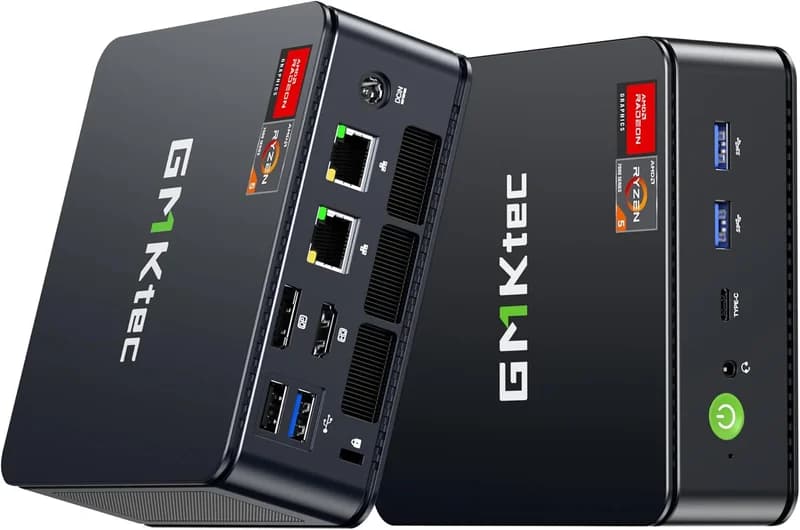
GMKtec M6 Ultra Mini PC (Ryzen 7 7640HS, 32GB)
$429 – $549Quick Answer
The top Mac Mini alternatives for local AI in 2026: Beelink SER8 ($449–$599, Ryzen 7 8845HS + Radeon 780M, 32GB DDR5-5600) — best palm-sized value; GMKtec M6 Ultra ($429–$549, Ryzen 7 7640HS Zen 4, 32GB DDR5) — best mid-range with Zen 4 efficiency; Intel NUC 13 Pro ($600–$900, Core i7-1360P, up to 64GB DDR4, Thunderbolt 4 for eGPU expansion) — pick this if you plan to add an NVIDIA GPU later; MAGICNUC AS1 ($229–$299, Ryzen 5 3550H, 16GB DDR4) — cheapest entry for small LLMs and always-on agent hosts. Choose a non-Mac mini PC if you want native Linux, a lower entry price, or Thunderbolt-eGPU expansion to NVIDIA. Otherwise the Mac Mini M4 Pro ($1,399, 24GB unified memory) is still the silent, zero-config winner for inference-only workflows up to ~22B parameters.
Last updated: May 10, 2026.
Why Look Beyond the Mac Mini for AI?
The Mac Mini M4 Pro is a phenomenal compact computer. Its unified memory architecture, silent operation, and Apple Silicon performance make it one of the best small-form-factor machines ever built. We covered it in depth in our Mac Mini M4 for AI guide.
But the Mac Mini isn't perfect for every AI workflow. If you need NVIDIA CUDA support, want to run native Linux, need user-upgradeable RAM beyond 64 GB, or simply want more bang for your buck — there's a growing class of powerful mini PCs that deserve your attention. The constraint that decides this is almost always memory — bandwidth and capacity — rather than raw compute, which is why a mini PC with 96 GB of fast DDR5 can hold models that will not fit on a 24 GB GPU at all, even though the GPU generates tokens far faster on anything that does fit.
When to Choose an Alternative Over the Mac Mini
- You need CUDA: Most ML frameworks (PyTorch, TensorFlow) have first-class NVIDIA CUDA support. Apple's Metal/MLX ecosystem is growing but still has gaps. If your workflow requires CUDA, you need a non-Mac machine.
- You want upgradeable RAM: Mac Mini RAM is soldered. Many mini PCs let you swap in 96 GB or even 128 GB of DDR5 yourself, at a fraction of Apple's upgrade pricing.
- You run Linux: While macOS supports many AI tools, the Linux ecosystem for ML is deeper and better documented. Many mini PCs ship with Linux or run it flawlessly.
- Budget matters: A well-specced AMD mini PC can undercut the Mac Mini M4 Pro by $300–500 while offering competitive or superior multi-threaded CPU performance.
- You want eGPU / OCuLink support: Some mini PCs offer OCuLink or Thunderbolt 4 ports for connecting an external NVIDIA GPU — turning a tiny box into a real AI workstation.
What to Look for in a Mini PC for AI
Before diving into specific models, here's what actually matters when evaluating a mini PC for AI and LLM workloads:
RAM: The #1 Bottleneck
Large language models are memory-hungry. A 7B parameter model in Q4 quantization needs roughly 4–6 GB of RAM. A 13B model needs 8–12 GB. A 70B model needs 40+ GB. More RAM = larger models you can load. Look for dual SO-DIMM slots supporting DDR5-5600 and at least 64 GB total capacity. Some boards support 96 GB. Tom's Hardware testing of mini PC memory configurations shows that DDR5-5600 in dual-channel mode delivers 15–20% higher tokens-per-second in llama.cpp benchmarks compared to DDR5-4800, making RAM speed a worthwhile consideration alongside capacity.
CPU: Cores and Cache
When running models on CPU (which you will be, on most mini PCs without a discrete GPU), core count and cache size directly impact tokens-per-second. AMD's Ryzen 7 and Ryzen 9 chips with Zen 4/5 architecture currently lead in multi-threaded CPU inference. Intel's latest Core Ultra chips are competitive, especially with their built-in NPU for certain workloads.
Integrated GPU and NPU
AMD's RDNA 3 integrated graphics (Radeon 780M) and Intel's Arc integrated GPUs can accelerate some inference tasks via Vulkan or OpenCL. Intel's newer chips include an NPU (Neural Processing Unit) that's starting to see framework support. Neither matches a discrete NVIDIA GPU, but they help.
Expandability
The best mini PCs for AI offer Thunderbolt 4 or OCuLink for connecting an external GPU enclosure. This lets you pair a tiny desktop with a full NVIDIA RTX 4090 or RTX 5090 when you need serious acceleration, and disconnect it when you don't.
Storage Speed
AI models are large files (4–40+ GB each). A fast NVMe PCIe 4.0 SSD ensures quick model loading. Dual M.2 slots let you keep your OS and models on separate drives.
Mac Mini Alternatives Compared: Specs at a Glance
Here's how the top contenders stack up against each other and the Mac Mini M4 Pro as a reference point:
| Device | CPU | Max RAM | Storage | Starting Price (est.) | AI Capability |
|---|---|---|---|---|---|
| Mac Mini M4 Pro (reference) | Apple M4 Pro (12-core) | 64 GB (unified, soldered) | Up to 4 TB NVMe | $599 (base M4) / $1,399 (M4 Pro) | Excellent (MLX/Metal) |
| Beelink SER8 | AMD Ryzen 7 8845HS (8C/16T) | 96 GB DDR5 (2x SO-DIMM) | Dual M.2 NVMe | ~$450–550 | Very Good (CPU + iGPU) |
| Intel NUC 13 Pro | Intel Core i7-1360P (12C/16T) | 64 GB DDR4 (2x SO-DIMM) | Dual M.2 NVMe | ~$600–900 | Good (CPU inference) |
| ASUS NUC 14 Pro+ | Intel Core Ultra 9 185H (16C/22T) | 96 GB DDR5 (2x SO-DIMM) | Dual M.2 PCIe 4.0 | ~$750–900 | Very Good (CPU + NPU + Arc iGPU) |
| Minisforum UM790 Pro | AMD Ryzen 9 7940HS (8C/16T) | 96 GB DDR5 (2x SO-DIMM) | Dual M.2 NVMe | ~$500–620 | Very Good (CPU + Radeon 780M) |
| Lenovo ThinkCentre M75q Tiny | AMD Ryzen 7 Pro 7730U (8C/16T) | 64 GB DDR5 (2x SO-DIMM) | M.2 NVMe + 2.5" bay | ~$550–700 | Good (reliable CPU inference) |
| System76 Meerkat | Intel Core Ultra 7 155H (16C/22T) | 96 GB DDR5 (2x SO-DIMM) | Dual M.2 NVMe | ~$700–850 | Very Good (Linux-native + NPU) |
1. Beelink SER8 — Best Value for AI Tinkering
The Beelink SER8 has become something of a cult favorite in the local AI community, and for good reason. It packs AMD's Ryzen 7 8845HS — a Zen 4 chip with 8 cores, 16 threads, and the Radeon 780M integrated GPU — into an absurdly compact chassis for well under $600.
Key Specs
- CPU: AMD Ryzen 7 8845HS (8 cores / 16 threads, up to 5.1 GHz)
- iGPU: AMD Radeon 780M (RDNA 3, 12 CUs)
- RAM: Up to 96 GB DDR5-5600 (2x SO-DIMM, user-upgradeable)
- Storage: Dual M.2 2280 NVMe slots
- Connectivity: USB4 (Thunderbolt compatible), Wi-Fi 6E, 2.5G Ethernet
- Power: ~45–65W TDP
AI Performance
With 64 GB of DDR5 installed, the SER8 can comfortably run 7B and 13B parameter models via Ollama at usable speeds. Community reports suggest roughly 8–15 tokens/second for Llama 3 8B (Q4_K_M) using CPU inference, which is perfectly adequate for interactive chat and code-assist workflows. The Radeon 780M iGPU can offload some layers via Vulkan in llama.cpp for a modest speed boost.
The Ryzen 8845HS also includes AMD's Ryzen AI NPU (XDNA), though software support for the NPU in mainstream LLM tools is still maturing in 2026.
Pros
- Outstanding price-to-performance ratio
- Upgradeable to 96 GB DDR5
- USB4 port enables external GPU connectivity
- Compact and relatively quiet under load
- Strong Linux compatibility (Ubuntu, Fedora run well)
Cons
- No discrete GPU — limited to CPU + iGPU inference
- Ryzen AI NPU software ecosystem still catching up
- Build quality is decent but not premium (plastic chassis)
- Fan can be audible under sustained heavy loads
View the Beelink SER8 on Compute Market →
2. Intel NUC 13 Pro — Proven Platform, Broad Ecosystem
The Intel NUC 13 Pro represents the last generation of Intel's own NUC line before ASUS took over the brand. It remains widely available, well-supported, and a solid choice for developers who value stability and a mature ecosystem.
Key Specs
- CPU: Intel Core i7-1360P (4 P-cores + 8 E-cores, 16 threads)
- iGPU: Intel Iris Xe (96 EUs)
- RAM: Up to 64 GB DDR4-3200 (2x SO-DIMM)
- Storage: Dual M.2 NVMe (one PCIe 4.0, one PCIe 3.0)
- Connectivity: Thunderbolt 4 (x2), Wi-Fi 6E, 2.5G Ethernet
- Power: ~28W TDP (configurable up to 64W)
AI Performance
The 13th-gen Intel chip handles 7B parameter models reasonably well via CPU inference, though it trails the AMD Ryzen 7/9 alternatives in raw multi-threaded throughput. The dual Thunderbolt 4 ports are a standout feature — they make eGPU setups straightforward, which could be the path to serious CUDA-accelerated AI work when you need it.
The DDR4 RAM limitation (64 GB max, and slower than DDR5) is the biggest constraint for AI workloads compared to newer alternatives.
Pros
- Dual Thunderbolt 4 ports — excellent for eGPU setups
- Rock-solid Linux support (long track record)
- Well-documented, large community
- Very low power draw at idle — great as an always-on inference server
- vPro availability for enterprise/remote management
Cons
- DDR4 only — capped at 64 GB and slower memory bandwidth than DDR5 alternatives
- 13th-gen Intel trails AMD Zen 4 in multi-threaded CPU inference
- Intel discontinued their NUC line — future support is via ASUS
- Higher price-per-GB of RAM compared to AMD alternatives
View the Intel NUC 13 Pro on Compute Market →
3. ASUS NUC 14 Pro+ — The NPU-Equipped Powerhouse
After acquiring Intel's NUC division, ASUS launched the NUC 14 Pro+ as the flagship of the new era. It's built around Intel's Core Ultra "Meteor Lake" processors, which bring a dedicated NPU (Neural Processing Unit) to the mini PC form factor for the first time.
Key Specs
- CPU: Intel Core Ultra 9 185H (6 P-cores + 8 E-cores + 2 LPE-cores, 22 threads)
- NPU: Intel AI Boost NPU (up to 11 TOPS)
- iGPU: Intel Arc (8 Xe-cores)
- RAM: Up to 96 GB DDR5-5600 (2x SO-DIMM)
- Storage: Dual M.2 2280 PCIe 4.0 NVMe
- Connectivity: Thunderbolt 4 (x2), Wi-Fi 7, 2.5G Ethernet
- Power: ~45W TDP (configurable)
AI Performance
The Core Ultra 9 185H is a strong multi-threaded performer, and the integrated Arc GPU provides better inference acceleration than older Intel Iris Xe graphics via OpenVINO and SYCL frameworks. The onboard NPU adds a third lane of AI acceleration, though as of mid-2026, NPU support in popular LLM tools (Ollama, llama.cpp) is still limited — it's more useful for vision and classification tasks currently.
With 96 GB of DDR5, this machine can load 30B+ parameter models (quantized) for CPU inference, making it one of the most capable mini PCs for larger models.
Pros
- Triple AI acceleration: CPU + Arc iGPU + NPU
- 96 GB DDR5 capacity handles large models
- Wi-Fi 7 and Thunderbolt 4 for modern connectivity
- Premium build quality (ASUS engineering)
- Active Intel/ASUS support and BIOS updates
Cons
- Higher price point — $750+ for the barebones kit
- NPU software ecosystem still maturing for LLM workloads
- Intel Arc iGPU drivers on Linux have improved but still trail AMD
- Can throttle under sustained all-core loads in the compact chassis
4. Minisforum UM790 Pro — The Community Favorite
Minisforum has built a strong reputation in the mini PC space, and the UM790 Pro is arguably their best offering for AI workloads. Powered by AMD's Ryzen 9 7940HS, it offers top-tier CPU performance and one of the best integrated GPUs available in a mini form factor.
Key Specs
- CPU: AMD Ryzen 9 7940HS (8 cores / 16 threads, up to 5.2 GHz)
- iGPU: AMD Radeon 780M (RDNA 3, 12 CUs)
- RAM: Up to 96 GB DDR5-5600 (2x SO-DIMM)
- Storage: Dual M.2 2280 NVMe slots (PCIe 4.0)
- Connectivity: USB4, HDMI 2.1, Wi-Fi 6E, 2.5G Ethernet
- Power: ~45–54W TDP
AI Performance
The Ryzen 9 7940HS edges out the Ryzen 7 8845HS in the Beelink SER8 by a small margin in sustained multi-threaded workloads thanks to a slightly higher boost clock and TDP allowance. Community benchmarks on the r/LocalLLaMA subreddit consistently show this chip delivering strong tokens/second performance for 7B–13B models.
The Radeon 780M iGPU is identical to the one in the Beelink SER8 and can be used for partial layer offloading. Minisforum's BIOS tends to give the iGPU a generous VRAM allocation (up to 8 GB shared), which helps when using GPU-accelerated inference paths.
Pros
- Ryzen 9 chip offers slightly more headroom than Ryzen 7 alternatives
- 96 GB DDR5 support
- USB4 port for potential eGPU use
- Strong community following — lots of guides and troubleshooting available
- Dual Ethernet (2.5G + 1G) on some configurations — useful for network inference servers
Cons
- Slightly pricier than the Beelink SER8 for marginal performance gains
- Build quality is mid-tier (functional, not premium)
- Fan noise is noticeable under sustained loads
- Minisforum's after-sales support can be inconsistent based on community reports
Best for: Users who want the strongest AMD CPU inference performance in a mini PC and don't mind paying a small premium over the Beelink SER8.
5. Lenovo ThinkCentre M75q Tiny — The Enterprise-Grade Pick
If reliability, support, and a proven enterprise track record matter to you, the Lenovo ThinkCentre Tiny series deserves serious consideration. It's not the flashiest option, but it's the one your IT department would approve.
Key Specs
- CPU: AMD Ryzen 7 Pro 7730U (8 cores / 16 threads, up to 4.5 GHz)
- iGPU: AMD Radeon 680M (RDNA 2, 12 CUs)
- RAM: Up to 64 GB DDR5-4800 (2x SO-DIMM)
- Storage: M.2 2280 NVMe + optional 2.5" SATA bay
- Connectivity: USB-C (DisplayPort Alt), Wi-Fi 6E, Gigabit Ethernet
- Power: ~15–28W TDP
AI Performance
The Ryzen 7 Pro 7730U is a lower-power chip than the HS-class processors in the Beelink and Minisforum options. It won't match them in sustained throughput — expect roughly 15–25% lower tokens/second on equivalent models. However, it runs cooler, quieter, and sips power, making it excellent as an always-on inference endpoint.
With 64 GB of RAM, it handles 7B models comfortably and can load 13B quantized models. The 2.5" drive bay is handy for bulk model storage alongside the NVMe boot drive.
Pros
- Lenovo enterprise build quality and multi-year warranty
- Extremely low power consumption (under 30W typical)
- Near-silent operation — suitable for a desk or bedroom
- VESA mountable — tuck it behind a monitor
- Widely available through business channels, often at discount
- Excellent Linux support (Red Hat certified on many ThinkCentre models)
Cons
- Lower TDP means slower sustained AI performance than HS-class chips
- 64 GB RAM ceiling is lower than 96 GB alternatives
- RDNA 2 iGPU (Radeon 680M) is a generation behind RDNA 3 (780M)
- No USB4 or Thunderbolt — limited eGPU options
- Conservative BIOS tuning limits overclocking/tweaking
6. System76 Meerkat — The Linux-First Option
For developers who live in Linux and want zero friction, the System76 Meerkat ships with Pop!_OS (or Ubuntu) pre-installed, with firmware, drivers, and BIOS updates managed through System76's own tooling. No Windows license tax, no driver hunting.
Key Specs
- CPU: Intel Core Ultra 7 155H (6 P-cores + 8 E-cores + 2 LPE-cores, 22 threads)
- NPU: Intel AI Boost NPU
- iGPU: Intel Arc (8 Xe-cores)
- RAM: Up to 96 GB DDR5-5600 (2x SO-DIMM)
- Storage: Dual M.2 2280 NVMe
- Connectivity: Thunderbolt 4 (x2), Wi-Fi 6E, 2.5G Ethernet
- Power: ~45W TDP
AI Performance
Performance is in the same ballpark as the ASUS NUC 14 Pro+ (they share a similar Intel Core Ultra platform). The real advantage here is the software experience: System76's Pop!_OS is configured out of the box for development workloads, with easy access to containerized AI environments, and their firmware update tool keeps everything current without manual BIOS flashing.
Pros
- Ships with Linux — no Windows license cost, no setup friction
- System76 firmware management (open-source firmware via coreboot on some models)
- Enthusiastic support team that understands developer use cases
- Dual Thunderbolt 4 for eGPU expansion
- Strong community and documentation
- 96 GB DDR5 support
Cons
- Premium pricing for what is essentially NUC-class hardware with software value-add
- Smaller company — parts and warranty support are narrower than Lenovo/ASUS
- Intel Arc iGPU Linux drivers, while improved, still aren't as mature as AMD's
- Limited availability outside the US
Power Consumption Comparison
For an always-on local AI server or inference endpoint, power draw matters. Here's how these machines compare at idle and under sustained AI inference loads (based on community measurements and manufacturer specs):
| Device | Idle Power | AI Inference Load | Annual Cost (est., $0.15/kWh) |
|---|---|---|---|
| Mac Mini M4 Pro | ~5–7W | ~30–40W | ~$25–50 |
| Beelink SER8 | ~8–12W | ~55–70W | ~$40–65 |
| Intel NUC 13 Pro | ~5–8W | ~35–55W | ~$30–50 |
| ASUS NUC 14 Pro+ | ~7–10W | ~50–65W | ~$35–55 |
| Minisforum UM790 Pro | ~8–12W | ~50–65W | ~$35–55 |
| Lenovo ThinkCentre Tiny | ~5–7W | ~25–35W | ~$20–40 |
| System76 Meerkat | ~7–10W | ~50–65W | ~$35–55 |
The Mac Mini M4 Pro remains the efficiency champion thanks to Apple Silicon's ARM-based architecture. The Lenovo ThinkCentre Tiny is the most power-efficient x86 option, making it ideal for always-on deployments where your electricity bill matters.
A Note on External GPU (eGPU) Setups
One of the biggest advantages of choosing a mini PC over a Mac Mini is the ability to pair it with an external NVIDIA GPU for CUDA-accelerated AI workloads. Here's the compatibility picture:
- Thunderbolt 4 (best for eGPU): Intel NUC 13 Pro, ASUS NUC 14 Pro+, System76 Meerkat
- USB4 (eGPU possible, variable support): Beelink SER8, Minisforum UM790 Pro
- Limited/no eGPU support: Lenovo ThinkCentre Tiny (USB-C only, no TB/USB4)
With a Thunderbolt 4 eGPU enclosure (like the Razer Core X or Sonnet Breakaway) and an NVIDIA RTX 4090 or RTX 5090, you can turn any of these tiny machines into a legitimate training and inference workstation. The Thunderbolt bandwidth bottleneck (roughly PCIe 3.0 x4) means you won't get 100% of the GPU's performance, but for inference and light fine-tuning it's perfectly practical.
If you're interested in more powerful dedicated setups, check out the Mac Studio M4 Max or browse our full AI laptop guide for portable options.
Verdict: Which Mac Mini Alternative Should You Buy?
Here are our recommendations by use case:
Best Overall Value: Beelink SER8
For most people experimenting with local AI, the Beelink SER8 hits the sweet spot. It's affordable, supports up to 96 GB DDR5, runs Linux well, and delivers strong CPU inference performance. Pair it with 64 GB of RAM and a 1 TB NVMe, and you have a capable local LLM machine for well under $700 all-in.
Best for eGPU Expansion: ASUS NUC 14 Pro+ or Intel NUC 13 Pro
If you plan to add an external NVIDIA GPU for CUDA workloads, the dual Thunderbolt 4 ports on the Intel NUC 13 Pro or ASUS NUC 14 Pro+ make them the best foundation. Start with CPU inference, add a GPU when your needs grow.
Best for Always-On Inference: Lenovo ThinkCentre Tiny
If you want a silent, sipping-power machine running 24/7 as a local AI API endpoint, the ThinkCentre Tiny's low TDP, enterprise reliability, and near-silent operation make it ideal. It won't win speed records, but it'll run reliably for years.
Best for Linux Purists: System76 Meerkat
No driver headaches, no Windows license, firmware updates through a GUI tool, and a company that actually understands what developers need. If you value your time over dollars, the Meerkat's out-of-box Linux experience is worth the premium.
Still the Best Overall Compact AI Machine: Mac Mini M4 Pro
Let's be honest — if you don't need CUDA, don't need upgradeable RAM, and are comfortable in the Apple ecosystem, the Mac Mini M4 Pro is still the most polished compact AI machine you can buy. Its power efficiency, silence, and the rapidly maturing MLX framework make it hard to beat for pure inference workloads. Read our full Mac Mini M4 for AI guide for the deep dive.
Compare Side by Side
See our detailed comparisons: Mac Mini M4 Pro vs Beelink SER8 → | Beelink SER8 vs Intel NUC 13 Pro →
Getting Started with Your Mini PC for AI
Whichever machine you choose, the setup process for local AI is similar:
- Install your OS: Ubuntu 24.04 LTS or Fedora 39+ are the best choices for AI/ML workloads. Pop!_OS if you're on a System76 machine.
- Install Ollama: One command:
curl -fsSL https://ollama.com/install.sh | sh. This gives you a local LLM runtime with a simple API. - Pull a model:
ollama pull llama3:8bfor a great starting point, orollama pull mistralfor a fast, capable alternative. - Optimize: Set your BIOS to performance mode, ensure your RAM is running at its rated XMP/EXPO speed, and configure the iGPU VRAM allocation if applicable.
- Go deeper: Read our complete guide to running LLMs locally for advanced configuration, model selection tips, and optimization techniques.
The local AI revolution is happening on hardware you can buy today, fit on your desk, and power from a regular outlet. Whether you go with an Apple Mac Mini or one of these capable alternatives, there's never been a better time to run AI on your own terms.
Frequently Asked Questions
Can a mini PC run large language models locally?
Yes. Modern mini PCs with 32–96 GB of RAM and fast CPUs with integrated or discrete GPUs can run quantized LLMs like Llama 3, Mistral, and Phi-3 locally using tools like Ollama or llama.cpp. Performance varies by model size and quantization level, but 7B–13B parameter models run well on most high-end mini PCs.
Why would I choose a mini PC over a Mac Mini for AI workloads?
The main reasons are CUDA GPU support (critical for many ML frameworks), user-upgradeable RAM and storage, broader Linux compatibility, and often a lower price for equivalent specs. If your AI workflow depends on NVIDIA CUDA, a Mac Mini simply won't work — you need a Windows or Linux-based alternative.
What specs matter most for running AI on a mini PC?
RAM is the single most important spec — you want at least 32 GB, ideally 64 GB or more, to load larger models into memory. After that, a fast multi-core CPU (AMD Ryzen 7/9 or Intel Core Ultra) and NVMe SSD storage for fast model loading are critical. If the mini PC supports an external GPU via Thunderbolt/OCuLink, that opens up NVIDIA acceleration.
Is the Mac Mini M4 Pro still worth buying for AI in 2026?
Absolutely — for users in the Apple ecosystem, the Mac Mini M4 Pro with its unified memory architecture and Apple Silicon MLX framework is excellent for inference tasks. It's the best option if you want a silent, power-efficient machine that just works. The alternatives shine when you need CUDA, Linux, or more RAM for less money.