Best AI Mini PC Under $500 in 2026: What 16–32GB of RAM Actually Runs Locally
Three sub-$500 mini PCs, honest tokens-per-second expectations, and the two specs that decide performance at this tier — memory capacity and memory channels, not NPU TOPS. Plus why the 2026 memory shortage makes a prebuilt cheaper than its own parts.
Compute Market Team
Disclosure: this article includes paid promotion from GMKtec via Amazon Creator Connections. We earn a commission on qualifying purchases.
Our Top Pick
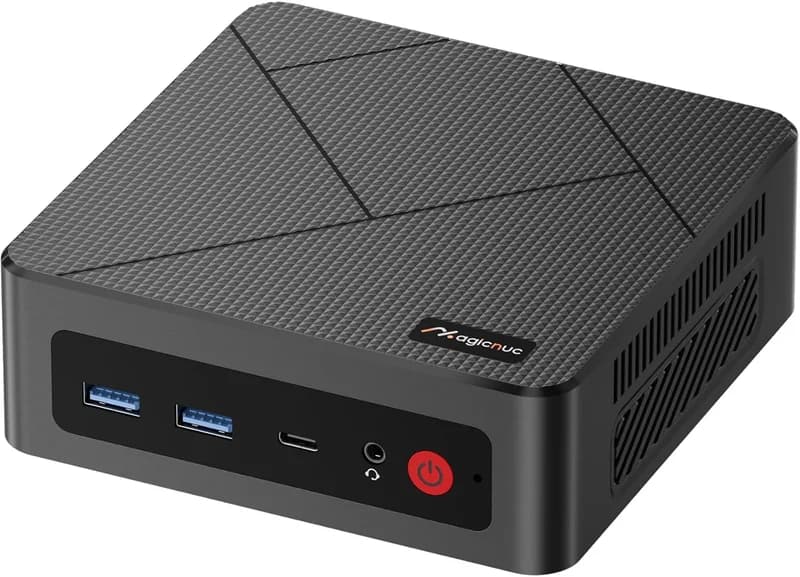
MAGICNUC AS1 Mini PC (Ryzen 5 3550H)
$229 – $299Quick Answer
In the 2026 memory shortage, a prebuilt 32GB mini PC costs less than buying its own RAM and SSD separately — which makes a $400–$500 prebuilt, not a DIY build, the cheapest honest way to run a 7B–13B model locally. Best pick under $500: the GMKtec M6 Ultra ($429 – $549), because 32GB is what moves you from "7B only" to "13B at Q4 comfortably". Best balance: the GMKtec M8 ($389 – $459). Cheapest viable: the MAGICNUC AS1 ($229 – $299). Expect 4–14 tokens per second, not 40.
Every roundup for this query lists CPU model numbers and an NPU TOPS figure and calls it a buying guide. None of them tell you the two things that decide whether you will be happy: how many tokens per second you will actually see, and which spec on the listing quietly halves that number. This guide is capped at a hard $500 and answers both.
If you want the full ladder from $229 to $4,000 — the 128GB Strix Halo tier, the Mac mini line, the 70B-class machines — that lives in our parent guide, Best Mini PC for AI in 2026. This post is deliberately narrower: three machines, one budget ceiling, and an explicit list of things these boxes cannot do. It sits inside our mini PC for AI hub and our AI on a budget hub.
The Short Answer: Three Machines, Three Budgets
If you read nothing else, read this table. Prices are catalog ranges as of 1 October 2026 and move weekly in this market — check the current listing before you buy.
| Best for | Pick | Memory | Price | Largest comfortable model | Expected tok/s (7B Q4) |
|---|---|---|---|---|---|
| The real pick under $500 | GMKtec M6 Ultra | 32GB DDR5 (SODIMM, upgradeable) | $429 – $549 | 13B–14B at Q4 | ~9–12 |
| Best balance / home-lab networking | GMKtec M8 | 16GB LPDDR5 (soldered) | $389 – $459 | 8B at Q4 | ~10–14 |
| Cheapest machine that isn't a waste | MAGICNUC AS1 | 16GB DDR4 | $229 – $299 | 7B at Q4 | ~4–6 |
Those tokens-per-second figures are our own estimates, not vendor claims, and the arithmetic behind them is shown below so you can check it against whatever machine you are actually looking at. They assume dual-channel memory, a Q4 GGUF model, and a short context. They are deliberately conservative: if a competing page promises you 30 tokens per second from a $400 box with integrated graphics, that page is quoting a prompt-processing number or a 1B model.
Why a $500 Mini PC Is Now a Better Deal Than $500 of Parts
This is the single most important thing to understand about buying at this tier in 2026, and it inverts the advice that was correct for the previous decade.
The memory shortage has split the DRAM market in two. OEMs — including the mini PC vendors — buy memory on forward contracts negotiated months ahead. You buy it at retail spot prices, today. In 2026 those two prices stopped tracking each other. XDA Developers reported in July 2026 that retail DDR5 SODIMM kits had climbed from under $100 to $375–$400 over roughly six months — an increase of about 300% — while DRAM contract prices rose 90–95% quarter over quarter. Both numbers are brutal. They are not the same number, and the gap between them is where the mini PC deal lives.
The same report put concrete figures on it. A mini PC with an eight-core Ryzen 7, 32GB of DDR5, and a 1TB NVMe drive retailed for an average of $559. Buying two of its components separately — a 32GB DDR5 SODIMM kit at $407 and a 1TB Gen 4 NVMe at $369 — came to $776.
| What you buy | Retail, July 2026 |
|---|---|
| Complete mini PC — 8-core Ryzen 7 + 32GB DDR5 + 1TB NVMe | $559 |
| 32GB DDR5 SODIMM kit (2×16GB), on its own | $407 |
| 1TB Gen 4 NVMe SSD, on its own | $369 |
| Those two components together | $776 |
Figures as reported by XDA Developers, 8 July 2026. CPU, chassis, cooling, power supply, Wi-Fi, and Windows licence are included in the $559 and excluded from the $776.
Read that again: the whole machine undercuts two of its own parts by more than $200, before you have paid for a CPU, a case, a power supply, or an operating system. This is why "just build it yourself" is wrong advice in 2026 at the entry tier, and it is why the sub-$500 mini PC is the best-value local AI machine on the market right now even though none of these boxes got faster. The backdrop, and what it means for GPUs rather than mini PCs, is in our DRAM shortage buying guide.
You can watch this play out inside our own catalog. The Beelink SER8 was a standard budget recommendation at this tier — a 32GB/1TB box that belonged in a sub-$600 roundup. On 28 September 2026 the live Amazon listing for that configuration read $939. It has not improved; the memory inside it simply repriced. Treat any sub-$500 32GB machine you find in stock as a contract-price artifact that will not survive the year.
What 16GB Actually Runs — and the Tokens Per Second You Should Expect
Start at the floor. The MAGICNUC AS1 is the cheapest configuration in this guide: a Ryzen 5 3550H, 16GB of DDR4, a 512GB NVMe, and Windows 11 Pro for $229 – $299. Street pricing has drifted above $300 during the shortage, so verify before you buy. It is a genuinely useful machine and it is also the clearest illustration of what 16GB buys you.
With no dedicated VRAM, every model you load lives in system RAM and is processed by the CPU and the integrated GPU. The budget breaks down roughly like this on a 16GB box:
- 7B at Q4 — about 4–5GB of weights. Comfortable. Mistral 7B, Qwen 3 7B, and DeepSeek-R1 7B all fit with room for a real context window.
- 8B–9B at Q4 — about 5–6GB. Still fine. Gemma 3 9B is the practical ceiling for a pleasant experience here.
- 13B–14B at Q4 — about 8–9GB of weights before context. Phi-4 14B loads, then the KV cache grows as your conversation does and the machine starts fighting the operating system for memory. Technically possible, not comfortable.
- 30B and above — out. Not slow: out. A 32B model at Q4 is roughly 18–20GB and there is nowhere to put it.
The honest headline on speed: these are single-digit-to-low-teens tokens-per-second machines. On the AS1 specifically, with DDR4 memory, expect roughly 4–6 tokens per second on a 7B at Q4. That is slower than you read aloud but faster than you read carefully, and for an always-on agent that works through a queue overnight it is entirely sufficient. For a chat window you are staring at, it will annoy you.
Two things make this acceptable rather than painful. First, Q4 quantization is not a meaningful quality compromise for 7B-class models at this tier — you would need a much faster machine before the difference between Q4 and Q8 was the thing limiting you. Second, Ollama keeps a model resident in memory between calls, so the multi-second load penalty is paid once rather than per request.
The arithmetic, so you can check any machine yourself
Token generation on a CPU or integrated GPU reads the entire model's weights from memory once per token. So the ceiling is simple:
The Formula
Maximum tokens per second ≈ memory bandwidth (GB/s) ÷ model size (GB). Real-world throughput lands at roughly 50–60% of that ceiling once you account for the KV cache, operating-system overhead, and imperfect memory access patterns.
Work an example. Dual-channel DDR4-2400 moves about 38 GB/s. A 7B model at Q4 is about 4.4GB. That is a ceiling of roughly 8.6 tokens per second, so a realistic 4–6 — which is the number in the table. Dual-channel DDR5-5600 moves about 90 GB/s, giving a ceiling near 20 and a realistic 9–12. The soldered LPDDR5 in the GMKtec M8 runs wider and faster still, which is why it edges ahead on 7B work despite having half the memory capacity of the M6 Ultra.
This formula is also the complete explanation for why CPU core count barely moves the needle here, and why the NPU figure moves it not at all. For the longer version of the CPU side of that argument, see best CPU for local LLM inference.
32GB Is the Upgrade That Matters (Not the CPU)
Here is the buying rule for this entire price band, stated as plainly as we can: at the sub-$500 tier, spend every marginal dollar on memory capacity and none of it on cores.
The step from the GMKtec M8 at $389 – $459 to the GMKtec M6 Ultra at $429 – $549 is roughly $50 at the low end of each range. Both are 6-core, 12-thread parts. The M6 Ultra's Ryzen 7 7640HS is a Zen 4 chip against the M8's Zen 3+ Ryzen 5 PRO 6650H, which is a real but modest generational gain. What you are actually buying for your $50 is 32GB of DDR5 instead of 16GB of LPDDR5, and that single change is the difference between a machine that runs 7B–8B models and a machine that runs 13B–14B models.
No amount of extra CPU performance produces that. You cannot core your way into a model that does not fit. This is the same logic that governs every tier of local AI hardware, and it is laid out in full in how much RAM you need for local AI in 2026.
Two further points in the M6 Ultra's favour at this budget. Its memory is socketed DDR5 SODIMM rather than soldered LPDDR5, so there is an upgrade path to 64GB later — though in the current market, buying that upgrade yourself is exactly the $400 trap described above, which is an argument for buying the 32GB configuration now rather than planning to upgrade. And its larger chassis sustains boost clocks longer than a palm-sized box under the continuous load that inference generates. The tradeoffs: a single 2.5GbE port instead of the M8's dual, and audible fan ramp during long generations.
When the M8 is the better buy
The GMKtec M8 wins on two specific profiles. If your largest model is 8B — which covers most agent loops, most retrieval pipelines, and every Home Assistant voice setup — its faster soldered LPDDR5 delivers more tokens per second than the M6 Ultra does on the same model, and you save the $50. And if you are putting the box into a home lab, the dual 2.5GbE is rare at this price and genuinely useful: one port to your LAN, one to a storage network or a second node. Our private AI server guide covers that topology.
Buy the M8 if you know your ceiling is 8B. Buy the M6 Ultra if you are not sure, because 32GB is the version of this machine you will not outgrow in six months.
The NPU Trap: 16 TOPS Does Not Help Your LLM
A budget mini PC's NPU TOPS rating does not affect local LLM token generation speed. Token generation is bound by memory bandwidth, so dual-channel RAM matters more than any advertised TOPS figure.
Budget mini PC listings lead with an NPU number because it is the most impressive-looking figure on the spec sheet. It is also, for the workload you are buying this machine for, irrelevant.
Ollama, llama.cpp, and LM Studio do not dispatch LLM token generation to the NPU. The work runs on the CPU, or on the integrated GPU via Vulkan or ROCm, reading weights out of system memory. The NPU sits idle. It is designed for fixed-function, low-power, sustained workloads — webcam background blur, noise suppression, small vision and audio models — and it is good at those. It is not a general-purpose matrix engine that your inference runtime can borrow.
So when you compare two boxes at $420 and one advertises 16 TOPS and the other says nothing, that comparison carries no information about how fast either one generates tokens. The numbers that do carry information are memory capacity (what fits) and memory bandwidth in GB/s (how fast it runs). TOPS and TFLOPS explains why the units do not translate, and what an "AI PC" actually is covers the marketing category in full.
The practical consequence: ignore the TOPS line entirely while shopping this tier. You will make better decisions with less information.
Single-Channel Memory Is the Spec That Actually Kills Performance
This is the most actionable sentence in the post, so it gets its own section: verify the machine ships dual-channel memory before you buy it.
The cheapest mini PCs hit their price by populating one SODIMM slot instead of two. A single 16GB stick and two 8GB sticks give you the same 16GB in Windows' task manager and roughly half the memory bandwidth. Since token generation scales almost linearly with bandwidth, a single-channel configuration roughly halves your tokens per second — on an otherwise identical machine, with an identical CPU and an identical NPU rating.
Half the throughput at this tier is the difference between 10 tokens per second and 5. That is the difference between usable and tedious, and it is invisible on most product listings. Almost no budget roundup mentions it.
How to check:
- Before buying — look for "2×8GB" or "2×16GB" in the specs. If the listing says only "16GB" with no channel detail, ask the seller or assume single-channel.
- Soldered LPDDR5 is usually fine — machines like the GMKtec M8 solder memory in a wide configuration by design, which is why soldered is not automatically a downgrade at this tier even though it blocks upgrades.
- After it arrives — on Windows, open Task Manager, Performance, Memory, and check "Slots used". On Linux, run
sudo dmidecode -t memory | grep -A2 "Memory Device"and count populated devices. - If it is single-channel — a matched second stick fixes it, but in this market that stick may cost a meaningful fraction of the machine. Factor it into the purchase price, or buy a box that is already dual-channel.
What You Give Up Versus Spending $800 or More
An honest ceiling, stated without hedging. Under $500 you are buying a 7B–14B machine that generates tokens at reading speed. Here is what the next rungs up add.
| Budget | What changes | Where to read more |
|---|---|---|
| Under $500 | 16–32GB shared memory. 7B–14B at Q4, 4–14 tok/s. No image generation, no fine-tuning. | This guide |
| $500 – $800 | Faster memory and better sustained clocks; 32GB becomes standard rather than the step-up. Same architectural ceiling. | Best mini PC for LLMs under $800 |
| $1,500+ | 128GB unified memory at 200+ GB/s. 70B dense models become possible. A different class of machine, not a faster version of this one. | Strix Halo mini PCs |
| Tower + used GPU | 24GB of real VRAM at ~900 GB/s. Several times the tokens per second, plus image generation and LoRA fine-tuning. Costs you silence, watts, and desk space. | Used RTX 3090 vs RTX 5060 Ti |
Say the uncomfortable part explicitly: a used RTX 3090 beats every machine in this guide on raw tokens per second, by a wide margin. Its 24GB of GDDR6X runs at roughly 936 GB/s against the ~90 GB/s of a good DDR5 mini PC — an order of magnitude. If a tower and roughly 350W under load are acceptable to you, that is the better local AI purchase and we will not pretend otherwise.
The mini PC's case is narrow and real: it idles at a handful of watts instead of 60–100, it is quiet enough to sit in a bedroom, and it fits behind a monitor. Over a year of 24/7 operation those watts are a visible line on a bill — see what local AI actually costs to run. If you want the machine on all the time, the mini PC wins. If you want it fast, it does not.
One adjacent option worth a line: the NVIDIA Jetson Orin Nano at $199 – $249 is also sub-$500 and has full CUDA support, which is tempting. It is not the pick here. With 8GB of memory it cannot hold a 7B model with useful context, and its real strength is edge vision work at 7–25W, not general LLM serving. Different machine for a different job. The ASUS NUC 13 Pro at $600 – $900 sits above this budget and its barebone configurations require you to supply the memory yourself — in 2026, the worst possible way to buy RAM.
Setup: From Unboxing to Your First Local Token
Fifteen minutes, start to finish, on any of the three machines. The full walkthrough with model recommendations and troubleshooting is in our Ollama setup guide; this is the short version.
- Check your memory channels first. Before you install anything, confirm dual-channel per the section above. Fixing this later means opening the box.
- Install Ollama. On Windows, run the installer from ollama.com. On Linux,
curl -fsSL https://ollama.com/install.sh | sh. - Pull a model sized to your machine. On 16GB:
ollama run qwen3:8b. On 32GB:ollama run phi4:14b. Start one size below your ceiling, not at it. - Measure before you tune. Run
ollama run qwen3:8b --verboseand read the eval rate it prints. That is your real tokens per second on your real hardware. Compare it to the table above; if it is roughly half what you expected, you are on single-channel memory. - Set it up as a service if it is always on. Ollama runs as a background service by default and listens on port 11434, so any machine on your LAN can use it. Leave
OLLAMA_HOSTbound to localhost unless you deliberately want that.
One optional spend worth knowing about: a 512GB boot drive fills quickly once you have four or five models on disk, since each 7B–14B Q4 download is 4–9GB.
If you plan to keep a model library rather than one model, add capacity. The Samsung 990 Pro 4TB at $289 – $339 is the drive we recommend generally, though be honest with yourself about the ratio: on a $250 machine, that drive costs more than the computer. A 1–2TB Gen 4 drive is the proportionate choice at this tier, and our NVMe SSD guide for local AI covers why drive speed matters for model load times and not at all for token generation. The broader setup context lives in our local LLM guide hub.
Don't Buy Any of These If…
Four disqualifiers. If any one of them describes you, none of the three machines above is the right purchase and you should spend differently rather than spending less.
- You want image or video generation. Stable Diffusion and the video models need real VRAM and real compute. An integrated GPU will produce an image eventually, measured in minutes per image rather than seconds. This is not a tier where that workload is viable.
- You want to run 30B+ models. Not slower — not at all. A 32B at Q4 needs roughly 18–20GB of weights plus context, which does not fit in 32GB alongside an operating system with any comfort, and nothing in this guide reaches 64GB. Go to the full mini PC ladder and look at the 128GB tier.
- You want to fine-tune. Even a QLoRA run on a 7B model wants a CUDA GPU with 16GB+ of VRAM. These machines are inference hosts, full stop.
- You need more than about 20 tokens per second. No configuration at this price reaches it. If you need a model to keep up with fast reading or to serve more than one person at once, buy a GPU — the GPU buying guide hub starts there.
The Verdict
Buy the GMKtec M6 Ultra at $429 – $549. The 32GB is the whole reason, and it is worth the roughly $50 premium over the 16GB alternative more than any other $50 you can move at this price point. Expect 9–12 tokens per second on a 7B at Q4 and 5–7 on a 14B, verify dual-channel on arrival, and ignore whatever the listing says about TOPS.
Buy the GMKtec M8 at $389 – $459 if you are certain 8B is your ceiling or you want the dual 2.5GbE for a home lab. Buy the MAGICNUC AS1 at $229 – $299 if the budget is hard and the job is a 7B model running an always-on agent where latency does not matter.
And buy now rather than planning to upgrade memory later. In the 2026 market, the RAM inside a prebuilt is the cheapest RAM you will ever own.
Frequently Asked Questions
Can a mini PC under $500 run a local LLM?
Yes — 7B and 8B models at Q4 quantization run comfortably on any of the three machines in this guide, and a 32GB box handles 13B–14B at Q4 as well. What you do not get is speed. With no dedicated VRAM, token generation runs on the CPU and integrated GPU against system memory, which puts a sub-$500 mini PC in the 4–14 tokens-per-second band depending on the model and the memory configuration. That is fast enough to read along with, fast enough for an always-on agent loop or a Home Assistant voice pipeline, and too slow for anything where you sit waiting on a long answer.
Is 16GB enough for local AI?
16GB is enough for 7B–8B models at Q4 and nothing larger with real comfort. A 7B model at Q4 occupies roughly 4–5GB of weights; add the KV cache for a useful context window and the operating system's own footprint and you are using 8–10GB of a 16GB machine. A 13B at Q4 needs about 8GB of weights before context, which fits on paper and starts swapping in practice once you open a long conversation. If you intend to run anything above 8B, buy 32GB — at this tier that upgrade costs about $50 and nothing else you can spend $50 on comes close.
Does the NPU in a budget mini PC speed up LLM inference?
No. Ollama, llama.cpp, and LM Studio do not route large-language-model token generation to the NPU — the NPU sits idle while the integrated GPU and the memory bus do the work. Token generation is memory-bandwidth-bound, so the number that predicts your tokens per second is GB/s of memory throughput, not the TOPS figure on the box. A 16 TOPS NPU is genuinely useful for background blur, noise suppression, and small vision models. It will not make Llama run faster.
Why is a prebuilt mini PC cheaper than building one in 2026?
Because OEMs buy DRAM on long-term contracts and you buy it at retail spot prices, and in 2026 those two numbers diverged violently. XDA Developers reported in July 2026 that a mini PC with an eight-core Ryzen 7, 32GB of DDR5, and a 1TB NVMe drive retailed for an average of $559, while a 32GB DDR5 SODIMM kit ($407) plus a 1TB Gen 4 NVMe ($369) bought separately came to $776. The complete machine cost less than two of its own components. At this tier, prebuilt is not a convenience premium in 2026 — it is a discount.
Should I buy a used GPU instead of a $500 mini PC?
If you can accommodate a tower and roughly 350W of power draw, yes — a used RTX 3090 with 24GB of VRAM generates tokens several times faster than any integrated-GPU mini PC, and it opens up image generation and fine-tuning that these boxes cannot do at all. The mini PC wins on three things only: idle power for 24/7 operation, near-silence, and footprint. If none of those three matter to you, you are buying the wrong machine.